Loading
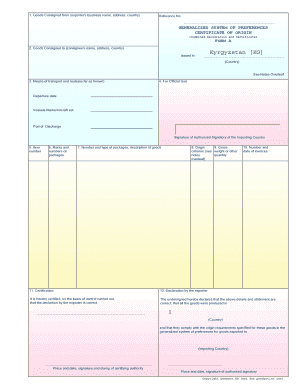
Get Unedocs.in.coo- Certificate Of Origin - Free-lance.ru
How it works
-

Open form follow the instructions
-

Easily sign the form with your finger
-

Send filled & signed form or save
How to fill out the UNeDocs.IN.CoO - Certificate Of Origin - Free-lance.ru online
Filling out the UNeDocs.IN.CoO - Certificate Of Origin form is a vital step in the export process that ensures compliance with origin requirements. This guide provides a clear, step-by-step approach to help you confidently complete the online form.
Follow the steps to successfully complete the Certificate Of Origin form.
- Click the 'Get Form' button to access the Certificate Of Origin form. This action will open the document in the designated online editor.
- In the first section, enter the exporter's business name, address, and country. Ensure that all information is accurate to prevent processing delays.
- Proceed to fill out the consignee's details, including their name, address, and country. Double-check the accuracy of this information as well.
- Provide information about the means of transport and the route, as far as known. This is important for tracking the goods.
- Complete the section for official use, if applicable. This may include departure date, vessel name, or aircraft details, and port of discharge.
- In the item number section, list the item numbers of the goods being exported. This helps in identifying the products accurately.
- Fill in the marks and numbers on packages, as well as the number and type of packages along with a brief description of the goods.
- Indicate the country of origin for the products. This is critical for determining eligibility under trade agreements.
- Provide details about the gross weight or other quantity criteria as specified in the guidelines.
- List the invoice number and date to reference the financial aspects of the transaction.
- Ensure the certification section is filled out accurately to confirm the correctness of the information provided.
- Finally, complete the declaration by the exporter. This includes certifying the details, the place and date, and the signatures required from the certifying authority and authorized signatory.
- Once all sections are completed, review the form for accuracy, then save your changes, download a copy, and print or share the form as needed.
Complete your documents online today for a smoother export experience.
Industry-leading security and compliance
US Legal Forms protects your data by complying with industry-specific security standards.
-
In businnes since 199725+ years providing professional legal documents.
-
Accredited businessGuarantees that a business meets BBB accreditation standards in the US and Canada.
-
Secured by BraintreeValidated Level 1 PCI DSS compliant payment gateway that accepts most major credit and debit card brands from across the globe.