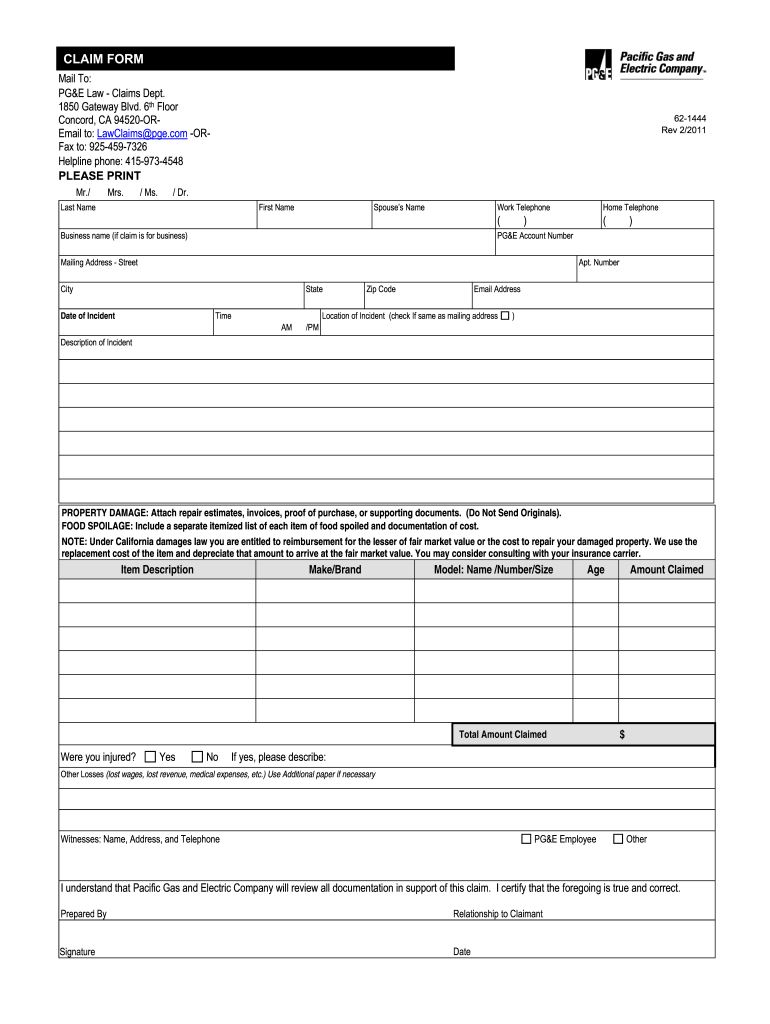
/2011 / Dr. Last Name First Name Spouse’s Name Work Telephone ( Business name (if claim is for business) Home Telephone ) ( ) PG&E Account Number Mailing Address - Street Apt. Number City State Time Date of Incident AM /PM Zip Code Email Address Location of Incident (check If same as mailing address ) Description of Incident PROPERTY DAMAGE: Attach repair estimates, invoices, proof of purchase, or supporting documents. (Do Not Send Originals). FOOD SPOILAGE: Include a .
Loading

Open form follow the instructions

Easily sign the form with your finger

Send filled & signed form or save
How to fill out the PG&E 62-1444 online
Filling out the PG&E 62-1444 form online can streamline the claims process for any damages or losses you may have experienced. This guide provides clear, step-by-step instructions to help you complete the form accurately and efficiently.
Follow the steps to complete your claim form online.
- To obtain the form, press the ‘Get Form’ button to access the document in the editor.
- Begin by entering your personal information in the designated fields such as last name, first name, and spouse's name if applicable.
- Provide your work and home telephone numbers, ensuring you include area codes.
- If you are filing on behalf of a business, include the business name in the specified field.
- Fill out your PG&E account number and complete your mailing address, including street address, apartment number, city, state, and zip code.
- Input the date and time of the incident in the appropriate fields, selecting AM or PM as necessary.
- Enter your email address to facilitate communication regarding your claim.
- Specify the location of the incident. If it is the same as your mailing address, check the corresponding box.
- In the 'Description of Incident' section, provide a clear explanation of the incident. Attach any necessary supporting documents for property damage or food spoilage.
- List item descriptions, including make, brand, model, age, and total amount claimed for each item damaged.
- Indicate whether you sustained any injuries and describe them if applicable.
- Detail any other losses, such as lost wages or medical expenses, using additional paper if necessary.
- Include information for any witnesses, along with their contact details.
- Indicate your relationship to the claimant, if you are not the claimant yourself.
- Sign and date the form to certify that the information you provided is accurate and complete.
- Review all completed fields for accuracy before saving your changes. You can then download, print, or share the form as needed.
Complete your PG&E claim form online today to ensure timely processing of your request.
Experience a faster way to fill out and sign forms on the web. Access the most extensive library of templates available.
Related content
Aug 12, 1997 — 08-572: Authorizing execution of contract with Pacific Gas &. Electric...
May 28, 2020 — ... PG&E Cp 10.93 -.15 PGTI PGT Inc 15.14 +.96 PNC PNC 116.60 +7.04 PNM...
Get answers to your most pressing questions about US Legal Forms API.
How do I actually talk to a person at the PG&E phone?
To speak with a representative at PG&E, dial their customer service number and follow the prompts. Look for options that guide you to speak with a live agent. It may take a few moments, but be patient; they will assist you with your inquiries or concerns. This direct communication can provide the clarity you need regarding your PG&E 62-1444 questions.
Is the Power Company responsible for spoiled food?
The power company may be liable for spoiled food if you can prove that their service failures caused the outage. However, this often depends on circumstances and local regulations. If you face such a situation involving PG&E 62-1444, documenting everything will be essential for any potential claims. Don't hesitate to reach out to their customer support for guidance.
How much is it to open a PG&E account?
Opening a PG&E account typically involves a deposit, which can vary based on your credit history. The exact amount will depend on your service type and location. To get a precise figure, it’s best to consult PG&E's official resources or contact their customer service. This way, you can prepare accordingly before setting up your account.
How do I request a new service with PG&E?
To request new service with PG&E, you can start by visiting their website and filling out the new service application. This process allows you to select the type of service you need, whether for a residential or commercial property. After submission, PG&E 62-1444 will guide you through the next steps, including scheduling a meter installation if necessary.
Does PG&E reimburse food loss?
PG&E offers reimbursement for food losses caused by a power outage under specific circumstances. You must file a claim and provide proof of the loss, such as receipts. Understanding the guidelines can help you navigate the claims process effectively. For more details, visit PG&E's website or contact their customer service.
Does insurance cover lost food due to power outage?
Insurance may cover lost food as a result of a power outage, depending on your policy. Check your homeowner's or renter's insurance for specific coverage details. If you experience a power outage linked to PG&E 62-1444, it's wise to document your losses. Always contact your insurance provider for clarity on your situation.
How do I actually talk to a person at PG&E?
To speak with a person at PG&E, dial their customer service number and follow the prompts for speaking to a representative. Patience is key, as wait times can vary. Clearly stating your inquiry regarding PG&E 62-1444 can help direct your call to the right department.
How can I get my PG&E account number as a new customer?
As a new customer, your PG&E account number will be included in the welcome packet sent to your address. If you can’t locate it, reach out to PG&E directly, and they can assist you in retrieving it. This account number is essential for managing your account effectively.
How do I call PG&E for a new service?
To set up new service with PG&E, call their designated customer service number. Be sure to have your identification and any necessary documentation ready. This will make the process smoother when discussing PG&E 62-1444.
What is the PG&E 18% discount?
The PG&E 18% discount program is designed to assist eligible low-income customers with their electricity bill. If you qualify, this discount can significantly lower your monthly payments. Applying online or by contacting customer service directly will help you take advantage of this benefit.
Use professional pre-built templates to fill in and sign documents online faster. Get access to thousands of forms.
If you believe that this page should be taken down, please follow our DMCA take down process here.