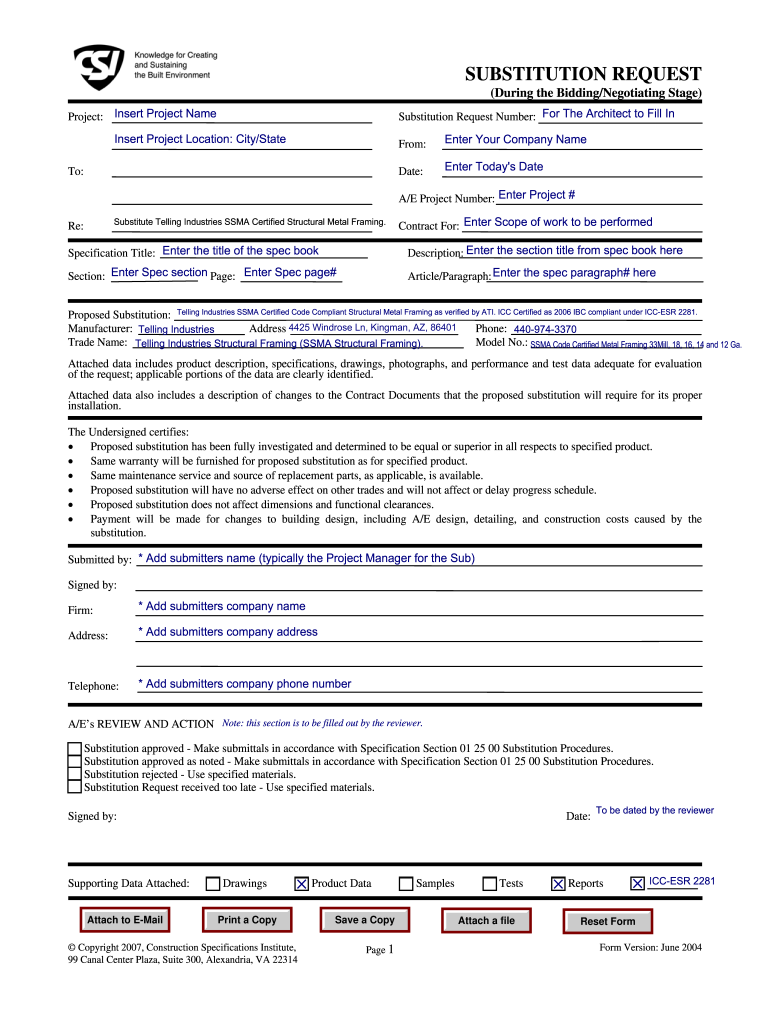
SUBSTITUTION REQUEST (During the Bidding/Negotiating Stage) Project: Insert Project Name Substitution Request Number: For The Architect to Fill In From: Date: Insert Project Location: City/State To:.
Loading

Open form follow the instructions

Easily sign the form with your finger

Send filled & signed form or save
How to fill out the Form 15c online
Filling out the Form 15c correctly is essential for submitting a substitution request during the bidding or negotiating stage of a project. This guide provides clear and user-friendly instructions to help you complete the form online effectively.
Follow the steps to successfully complete your Form 15c online.
- Click the 'Get Form' button to obtain the document and open it in the editor.
- Enter the project name in the designated section. This identifies the specific project related to your substitution request.
- Input the substitution request number, which should be filled in by the architect during processing.
- Provide the project location, specifying the city and state where the project is taking place.
- Enter your company name in the section labeled 'From.' This establishes your business as the submitter of the request.
- Insert today's date where indicated to document the submission date.
- Fill in the A/E project number. This should correspond to the architectural/engineering project number associated with your work.
- Specify the item you are proposing as a substitution, noting that it must be SSMA certified structural metal framing.
- Indicate the contractual scope of work related to the substitution request in the 'Contract For' section.
- Enter the specification title of the spec book in the relevant field to ensure proper referencing of documentation.
- Provide the section title from the specification book that pertains to your request.
- Record the applicable spec section and page number to assist the reviewer in locating the relevant information.
- Clearly detail the article or paragraph number from the specifications that your substitution affects.
- Describe the proposed substitution, ensuring to highlight certifications and compliance details.
- Include the manufacturer's name, address, and telephone to facilitate communication regarding the proposed substitution.
- Document the trade name, model number, and relevant product information in the appropriate fields.
- Attach supporting data, such as product descriptions and specifications, to provide a comprehensive review package.
- Certify that your proposed substitution has been investigated thoroughly and is equal or superior to the specified product.
- Fill in the submitter’s name, company name, address, and phone number in the designated sections at the bottom of the form.
- Allow the A/E reviewer to fill in their notes and sign off on the substitution before finalizing the submission.
- Finally, save your changes, download, print, or share the completed form as required.
Complete your substitution requests online now for seamless project management.
Experience a faster way to fill out and sign forms on the web. Access the most extensive library of templates available.
Related content
w You must show documents to prove your identity (see form ID-44 for acceptable proofs of...
17 CFR Part 449 - FORMS, SECTION 15C OF THE SECURITIES EXCHANGE ACT OF 1934. CFR. prev...
Like the current F-15C, this plane is designed for a single pilot. ... as well as a pair...
Get answers to your most pressing questions about US Legal Forms API.
What is Form 15c?
1[FORM NO 15C [See rule 29B] Application by a banking company or insurer for a certificate under section 195(3) of the Income - tax Act, 1961, for receipt of interest and other sums without deduction of tax. To.
How can I get 15G form from PF withdrawal?
Form 15G can be easily found and downloaded for free from the website of all major banks in India as well as the official EPFO portal. Additionally, this form can also be easily downloaded from the Income Tax Department website.
Is Form 15H mandatory for PF withdrawal?
No, you don't have to submit this form directly to the income tax department. Just submit it to the deductor, and they will prepare and submit it to the income tax department.
What is form 10 in income tax?
Form 10 is filed as an application for the registration of a religious charity/trust/institution, as per Section 12A the Income-tax Act, 1961. ...
Who is eligible for Form 15G?
Eligibility criteria for submitting Form 15G You are an individual or a person other than a company or a firm. You must be a resident Indian for the applicable Financial Year. Your age should be 60 years or less than. Tax liability calculated on the total taxable income for the Financial year is zero.
How can I download Form 15H for PF withdrawal?
Login to EPFO UAN Unified Portal for members. Click on the ONLINE SERVICES option Claim (Form 31, 19, 10C). Verify the last 4 digits of your bank account. Below the option, 'I want to apply for', click on Upload form 15G as depicted in the image.
How can I file Form 15C?
Step 1 Download FORM 15CB utility from Downloads page and prepare the XML File. Step 2 Login to e-Filing, Go to e-File -> Upload Form, Enter PAN/TAN of assesse, PAN of CA, Select Form Name as 15CB, Select Filing Type as Original. Step 3 Upload the XML generated from the downloaded utility.
Is 15G form required for PF withdrawal?
In case of EPF withdrawals before 5 years of service: Tax Deducted at source: TDS is applicable @ 34.608% in case of NO Permanent Account Number (PAN) Tax Deducted at Source: TDS @ 10% is chargeable when Permanent Account Number (PAN) is submitted without form 15 G/ 15H.
What is Form 15G in PF?
You can check the latest tax slabs in my latest post Latest Income Tax Slab Rates FY 2019-20 (AY 2020-21) . ... 15G or 15H are self-declaration forms that can be furnished by individuals to state that their income is BELOW the taxable limit and hence no TDS should be deducted.
How do I fill 15ca and 15cb online?
Step 1 Download FORM 15CB utility from Downloads page and prepare the XML File. Step 2 Login to e-Filing, Go to e-File -> Upload Form, Enter PAN/TAN of assesse, PAN of CA, Select Form Name as 15CB, Select Filing Type as Original. Step 3 Upload the XML generated from the downloaded utility.
Use professional pre-built templates to fill in and sign documents online faster. Get access to thousands of forms.
If you believe that this page should be taken down, please follow our DMCA take down process here.