Loading
Get Metlife 403bhardshipwd 2008-2026
How it works
-

Open form follow the instructions
-

Easily sign the form with your finger
-

Send filled & signed form or save
How to fill out the MetLife 403BHARDSHIPWD online
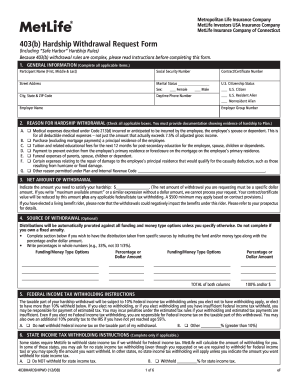
This guide provides clear, step-by-step instructions on how to fill out the MetLife 403(b) Hardship Withdrawal Request Form online. Ensuring proper completion of this form is crucial to facilitate your hardship withdrawal request efficiently.
Follow the steps to submit your hardship withdrawal request.
- Click 'Get Form' button to access the MetLife 403(b) Hardship Withdrawal Request Form and open it in your preferred editor.
- Complete the General Information section by entering all applicable details, including your name, social security number, marital status, and citizenship status.
- In the Reason for Hardship Withdrawal section, check all relevant reasons for your request and ensure that you provide supporting documentation for each reason indicated.
- Indicate the net amount of the withdrawal you need in the Net Amount of Withdrawal section. This should be a specific dollar amount to satisfy your financial need.
- If applicable, specify the Source of Withdrawal by indicating which funding options to draw from and the amounts or percentages relevant to each before proceeding.
- Complete the Federal Income Tax Withholding Instructions to choose the percentage of tax that should be withheld from your withdrawal, as required.
- If necessary, fill out the State Income Tax Withholding Instructions with the desired percentage of state tax to be withheld.
- In the Payment Instructions section, provide the address where you want the distribution check sent, ensuring clarity for processing.
- Read and sign the Participant Statement & Signature section to confirm the accuracy of the information provided and acknowledge understanding of the withdrawal conditions.
- For ERISA plans, include the Plan Information and Plan Administrator/Authorized Representative or Employer Statement, ensuring that it is signed by the relevant representative.
- If your plan includes QJSA provisions, complete the Annuity Information, QJSA, and Notice Waiver, and obtain spousal consent if applicable.
- Once you have completed all sections, review your form for accuracy, then save your changes, and prepare to download, print, or share the completed form as needed.
Take the first step toward your financial relief by completing the MetLife 403BHARDSHIPWD online today.
Filing a preferred mutual claim is easy with MetLife’s user-friendly process. You can begin by downloading the MetLife 403BHARDSHIPWD form from their website. After filling it out carefully, submit it either online or through the mail. Utilizing the proper channels helps ensure your claim is processed efficiently.