Loading
Form preview
  • US Legal Forms
  • Other Templates
  • More Forms
  • More Multi-State Forms
  • Filling Out A Blank Check For Direct Deposit Form

Get Filling Out A Blank Check For Direct Deposit Form

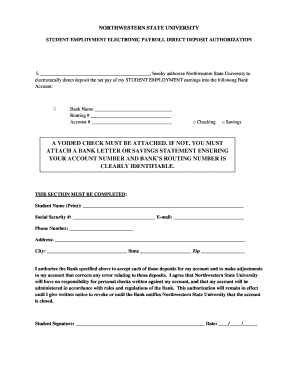
NORTHWESTERN STATE UNIVERSITY STUDENT EMPLOYMENT ELECTRONIC PAYROLL DIRECT DEPOSIT AUTHORIZATION I, , hereby authorize Northwestern State University to electronically direct deposit the net pay of.

How it works

  1. Open form

    Open form follow the instructions

  2. Easily sign form

    Easily sign the form with your finger

  3. Share form

    Send filled & signed form or save

How to fill out the Filling Out A Blank Check For Direct Deposit Form online

Completing the Filling Out A Blank Check For Direct Deposit Form online is a straightforward process that ensures your earnings are deposited directly into your bank account. This guide will walk you through each section of the form step by step, helping you to fill it out accurately and efficiently.

Follow the steps to fill out the form correctly.

  1. Click 'Get Form' button to access the form and open it in the online editor.
  2. Begin by filling in your bank details. Enter the Bank Name in the designated field. This should be the name of the institution where your account is held.
  3. Next, input your Routing Number, which is a nine-digit code that identifies your bank. Ensure that you enter this accurately as any mistake may delay your deposit.
  4. In the Account Number field, write your account number. This is the number associated with your personal bank account.
  5. Select the type of account you wish to use for direct deposit by checking either the Checking box or the Savings box.
  6. Attach a voided check or a bank letter/savings statement with your account and routing numbers clearly visible. This document will verify your banking information.
  7. Complete the personal information section. Print your name in the Student Name field and fill in the remaining details: Social Security Number, Email, Phone Number, Address, City, State, and Zip Code.
  8. Read the authorization statement carefully. By signing, you agree to the terms and authorize the university to direct deposit your earnings.
  9. Sign and date the form at the bottom to confirm your authorization.
  10. Once all required fields are filled out, review the form for accuracy. You can then save the changes, download, print, or share the form as needed.

Start filling out your documents online today to ensure timely direct deposits.

Get form

Experience a faster way to fill out and sign forms on the web. Access the most extensive library of templates available.
Get form

Related content

Direct Deposit Form Instructions by Field...
Direct Deposit Form Instructions by Field. ▫ Employee Name – Please fill in using the...
Learn more

Related links form

Vista Oncology Notice Of Privacy Practices Vista Oncology Notice Of Privacy Practices 2019 Priority Partners Pharmacy Prior Authorization Form 2014 Establishment Labs FOR-302 2021

Questions & Answers

Get answers to your most pressing questions about US Legal Forms API.

Contact support

The voided check is not really necessary to set up direct deposit. ... In order to do direct deposit, the payroll company needs your bank's routing number and your account number. These are printed on the lower left of each check, but they are often available on your bank's web site or elsewhere.

Bank account number. Routing number. Type of account (typically a checking account) Bank name and address you can use any branch of the bank or credit union you use. Name(s) of account holders listed on the account.

Direct deposit is easy to use. Just select it as your refund method through your tax software and type in the account number and routing number. Or, tell your tax preparer you want direct deposit. You can even use direct deposit if you are one of the few people still filing by paper.

Download our Direct Deposit Authorization form. Fill out the form and staple a voided Fifth Third check to it. For a voided check, write VOID across a blank check. Give the completed form to the company making the direct deposit. For payroll direct deposit, give the form to your HR contact.

It's technically never completely safe to share bank account information. In some cases, all fraudsters need are your account and routing numbers to perpetrate banking identity theft. This means, in the wrong hands, something as basic as a blank check can compromise your financial security.

You will need to know two pieces of information your account number and the routing number for your financial institution.

Write your name and address in the space at the upper left of the check. ... Write the check number in the space provided at the upper right of the check. Enter the date on the line below the check number. Starting at the left of the check is a line labeled "Pay to the order of." This is the payee line.

It's technically never completely safe to share bank account information. In some cases, all fraudsters need are your account and routing numbers to perpetrate banking identity theft. This means, in the wrong hands, something as basic as a blank check can compromise your financial security.

If you use your bank's direct deposit form, you'll likely need your employer's address. Bank's routing number. This is the nine-digit number, also known as the American Bankers Association or ABA number, printed on your bank statement or along the bottom left of your checks. Your account number.

Log on to your online bank account and verify that you have sufficient funds in the account to cover the direct deposit payment you want to make. Follow the prompts to enter the information from Step 2. Enter the amount you wish to pay. Again, follow the prompts to authorize and send the payment.

Get This Form Now!

Use professional pre-built templates to fill in and sign documents online faster. Get access to thousands of forms.
Get form
If you believe that this page should be taken down, please follow our DMCA take down processhere.
Get Filling Out A Blank Check For Direct Deposit Form
Get form
  • Adoption
  • Bankruptcy
  • Contractors
  • Divorce
  • Home Sales
  • Employment
  • Identity Theft
  • Incorporation
  • Landlord Tenant
  • Living Trust
  • Name Change
  • Personal Planning
  • Small Business
  • Wills & Estates
  • Packages A-Z
  • Affidavits
  • Bankruptcy
  • Bill of Sale
  • Corporate - LLC
  • Divorce
  • Employment
  • Identity Theft
  • Internet Technology
  • Landlord Tenant
  • Living Wills
  • Name Change
  • Power of Attorney
  • Real Estate
  • Small Estates
  • Wills
  • All Forms
  • Forms A-Z
  • Other Templates
  • Legal Hub
  • About Us
  • Help Portal
  • Legal Resources
  • Blog
  • Affiliates
  • Contact Us
  • Delete My Account
  • Site Map
  • Industries
  • Forms in Spanish
  • Localized Forms
  • State-specific Forms
  • Forms Kit
  • Real Estate Handbook
  • All Guides
  • Notarize
  • Incorporation services
  • For Consumers
  • For Small Business
  • For Attorneys
  • USLegal
  • FormsPass
  • pdfFiller
  • signNow
  • altaFlow
  • DocHub
  • Instapage
Form Packages
  • Adoption
  • Bankruptcy
  • Contractors
  • Divorce
  • Home Sales
  • Employment
  • Identity Theft
  • Incorporation
  • Landlord Tenant
  • Living Trust
  • Name Change
  • Personal Planning
  • Small Business
  • Wills & Estates
  • Packages A-Z
Form Categories
  • Affidavits
  • Bankruptcy
  • Bill of Sale
  • Corporate - LLC
  • Divorce
  • Employment
  • Identity Theft
  • Internet Technology
  • Landlord Tenant
  • Living Wills
  • Name Change
  • Power of Attorney
  • Real Estate
  • Small Estates
  • Wills
  • All Forms
  • Forms A-Z
  • Other Templates
Customer Service
  • Legal Hub
  • About Us
  • Help Portal
  • Legal Resources
  • Blog
  • Affiliates
  • Contact Us
  • Delete My Account
  • Site Map
  • Industries
  • Forms in Spanish
  • Localized Forms
  • State-specific Forms
  • Forms Kit
Legal Guides
  • Real Estate Handbook
  • All Guides
Prepared for you
  • Notarize
  • Incorporation services
Our Customers
  • For Consumers
  • For Small Business
  • For Attorneys
Our Sites
  • USLegal
  • FormsPass
  • pdfFiller
  • signNow
  • altaFlow
  • DocHub
  • Instapage
Social Media
Call us now toll free:
+1 833 426 79 33
As seen in:
© Copyright 1999-2026 airSlate Legal Forms, Inc. 17 Station Street, Ste. 203, Brookline, MA 02445
  • Your Privacy Choices
  • Terms of Service
  • Privacy Notice
  • Content Takedown Policy
  • Bug Bounty Program