We use cookies to improve security, personalize the user experience, enhance our marketing activities (including cooperating with our marketing partners) and for other business use.
Click "here" to read our Cookie Policy. By clicking "Accept" you agree to the use of cookies. Read less
Read more
Accept
Loading
Form preview
  • US Legal Forms
  • Form Library
  • More Forms
  • More Multi-State Forms
  • Mohawk College Verification Of Attendance

Get Mohawk College Verification Of Attendance

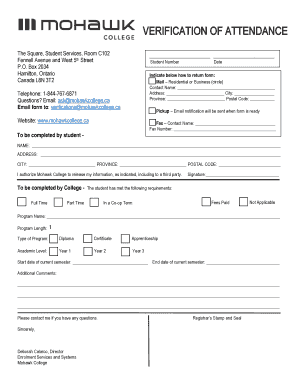
VERIFICATION OF ATTENDANCE The Square, Student Services, Room C102 Fennell Avenue and West 5th Street P.O. Box 2034 Hamilton, Ontario Canada L8N 3T2 Student NumberDateIndicate below how to return.

How it works

  1. Open form

    Open form follow the instructions

  2. Easily sign form

    Easily sign the form with your finger

  3. Share form

    Send filled & signed form or save

How to fill out the Mohawk College Verification Of Attendance online

Completing the Mohawk College Verification Of Attendance is a straightforward process that ensures your educational information is accurately documented. Follow this guide for a step-by-step approach to filling out the form online.

Follow the steps to complete your verification form effectively.

  1. Press the ‘Get Form’ button to obtain the Verification Of Attendance form and open it in your preferred editor.
  2. Enter your student number in the designated field at the top of the form. This number helps identify your records accurately.
  3. Fill in the date on which you are completing the form. This is important for record-keeping purposes.
  4. Indicate your preferred method for returning the form by selecting mail, pickup, or fax. If you choose mail, provide the contact name, address, city, province, and postal code.
  5. If selecting pickup, ensure to provide an accurate and reliable email address, as you will receive a notification when your form is ready.
  6. For the fax option, enter the contact name and fax number in the provided fields.
  7. Complete the student section by providing your full name, address, city, province, and postal code.
  8. Authorize Mohawk College to release your information by signing where indicated. This consent is necessary for processing your verification.
  9. In the college completion section, ensure the college staff checks the appropriate boxes indicating your enrollment details, such as full-time or part-time status.
  10. Fill in the program name, length, type of program (diploma, certificate, apprenticeship), and academic level (year) as required.
  11. Provide the start and end date of your current semester in the specified fields.
  12. Add any additional comments necessary for your situation in the comments section.
  13. Finally, review all entered information for accuracy. You can then choose to save your changes, download, print, or share the completed form as needed.

Complete your documents online efficiently and ensure your educational information is correctly verified.

Get form

Experience a faster way to fill out and sign forms on the web. Access the most extensive library of templates available.
Get form

Related content

Academic Transcripts from Closed, Merged, or...
If the Office of College and University Evaluation, NYS Education Department is listed as...
Learn more
Verifying Attendance | Mohawk Valley Community...
Attendance Verification. If you fall under the following VA educational programs, then you...
Learn more
Brooks County ISD Student Handbook
Right of Access to Student Records, Curriculum Materials, and District ... Driver License...
Learn more

Related links form

AZ ADOT 43-5106 2015 AZ ADOT 43-5106 2018 AZ ADOT 46-0307 2019 NJ SP-121 2019

Questions & Answers

Get answers to your most pressing questions about US Legal Forms API.

Contact support

Install Microsoft Outlook from the AppStore (new window). Open the Outlook app and enter your Mohawk employee email address. ... After 10-15 seconds, tap Setup Account Manually when the button appears. Tap Exchange. Enter account and server information as shown. ... Tap Sign In.

To get an official copy of your transcript, contact your school's registrar. In most cases, you don't even have to call or go in person; the registrar's office may have an online form for requesting your transcript. You can usually pay the transcript fee online too.

However, you can call your school and ask for it or order them online for free through your school's website. You can as well, use a third-party website to have unofficial or official transcripts sent to you or sent to the institution of your choice.

Transcript requests must be submitted through your MyMohawk account. Ensure that you complete the full request form including the number of transcripts needed and accurate delivery information.

How do I find my MohawkID? If you can't find your MohawkID on your documents or you are no longer a student at Mohawk, contact The Square Student Services at 1-844-767-6871 to get your student information.

Go to webmail.mohawkcollege.ca (new window) Enter your MohawkID using this format: 000101060@mohawkcollege.ca. You must enter your MohawkID followed by @mohawkcollege.ca. Enter your MohawkID password.

If the school accepts electronic transcripts, it may take 24 to 48 hours. If a hard copy is required, it can take a few days to be received. If the schools are on each coast, it could take over a week. Students should also consider how long it may take your program to confirm receipt of your transcript.

Your MohawkID is a 9-digit number also known as your student number. It's used to access all services at Mohawk College including MyCanvas, email, wifi, MyMohawk, Office365, MohawkAPPS, and more.

Step 1: Click to sign in. Step 2: Enter your Mohawk College email address (not your student number) Step 3: One more time... enter your Mohawk College email address again. Your Office 365 widget is now ready to use in eLearn. You now have access to three Office 365 tools that are integrated with eLearn: Outlook (webmail)

For General Information or to reach the main Mohawk College phone line, call 905-575-1212. For Admissions, call 1-844-767-6871. For Registration, call 1-844-767-6871.

Get This Form Now!

Use professional pre-built templates to fill in and sign documents online faster. Get access to thousands of forms.
Get form
If you believe that this page should be taken down, please follow our DMCA take down processhere.

Industry-leading security and compliance

US Legal Forms protects your data by complying with industry-specific security standards.
  • In businnes since 1997
    25+ years providing professional legal documents.
  • Accredited business
    Guarantees that a business meets BBB accreditation standards in the US and Canada.
  • Secured by Braintree
    Validated Level 1 PCI DSS compliant payment gateway that accepts most major credit and debit card brands from across the globe.
Get Mohawk College Verification Of Attendance
Get form
Form Packages
Adoption
Bankruptcy
Contractors
Divorce
Home Sales
Employment
Identity Theft
Incorporation
Landlord Tenant
Living Trust
Name Change
Personal Planning
Small Business
Wills & Estates
Packages A-Z
Form Categories
Affidavits
Bankruptcy
Bill of Sale
Corporate - LLC
Divorce
Employment
Identity Theft
Internet Technology
Landlord Tenant
Living Wills
Name Change
Power of Attorney
Real Estate
Small Estates
Wills
All Forms
Forms A-Z
Form Library
Customer Service
Terms of Service
Privacy Notice
Legal Hub
Content Takedown Policy
Bug Bounty Program
About Us
Help Portal
Legal Resources
Blog
Affiliates
Contact Us
Delete My Account
Site Map
Industries
Forms in Spanish
Localized Forms
State-specific Forms
Forms Kit
Legal Guides
Real Estate Handbook
All Guides
Prepared for You
Notarize
Incorporation services
Our Customers
For Consumers
For Small Business
For Attorneys
Our Sites
US Legal Forms
USLegal
FormsPass
pdfFiller
signNow
airSlate WorkFlow
DocHub
Instapage
Social Media
Call us now toll free:
+1 833 426 79 33
As seen in:
  • USA Today logo picture
  • CBC News logo picture
  • LA Times logo picture
  • The Washington Post logo picture
  • AP logo picture
  • Forbes logo picture
© Copyright 1997-2025
airSlate Legal Forms, Inc.
3720 Flowood Dr, Flowood, Mississippi 39232
Form Packages
Adoption
Bankruptcy
Contractors
Divorce
Home Sales
Employment
Identity Theft
Incorporation
Landlord Tenant
Living Trust
Name Change
Personal Planning
Small Business
Wills & Estates
Packages A-Z
Form Categories
Affidavits
Bankruptcy
Bill of Sale
Corporate - LLC
Divorce
Employment
Identity Theft
Internet Technology
Landlord Tenant
Living Wills
Name Change
Power of Attorney
Real Estate
Small Estates
Wills
All Forms
Forms A-Z
Form Library
Customer Service
Terms of Service
Privacy Notice
Legal Hub
Content Takedown Policy
Bug Bounty Program
About Us
Help Portal
Legal Resources
Blog
Affiliates
Contact Us
Delete My Account
Site Map
Industries
Forms in Spanish
Localized Forms
State-specific Forms
Forms Kit
Legal Guides
Real Estate Handbook
All Guides
Prepared for You
Notarize
Incorporation services
Our Customers
For Consumers
For Small Business
For Attorneys
Our Sites
US Legal Forms
USLegal
FormsPass
pdfFiller
signNow
airSlate WorkFlow
DocHub
Instapage
Social Media
Call us now toll free:
+1 833 426 79 33
As seen in:
  • USA Today logo picture
  • CBC News logo picture
  • LA Times logo picture
  • The Washington Post logo picture
  • AP logo picture
  • Forbes logo picture
© Copyright 1997-2025
airSlate Legal Forms, Inc.
3720 Flowood Dr, Flowood, Mississippi 39232