Loading
Get Request For Approved Program Capacity And Noncontiguous ...
How it works
-

Open form follow the instructions
-

Easily sign the form with your finger
-

Send filled & signed form or save
How to fill out the Request For Approved Program Capacity And Noncontiguous Clearance online
Filling out the Request For Approved Program Capacity And Noncontiguous Clearance form can seem daunting, but with a clear outline and step-by-step guidance, you can complete it confidently. This guide provides detailed instructions to help users navigate each section effectively.
Follow the steps to fill out the form correctly.
- Press the ‘Get Form’ button to access the form and open it in your preferred online editor.
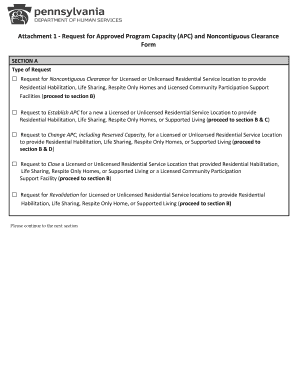
- In Section A, select the type of request you are submitting by marking the appropriate checkbox. Choose between requests for noncontiguous clearance, establishing APC, changing APC, closing a service location, or revalidation.
- Proceed to Section B. Enter the legal entity name, the street address along with the city, state, and zip code of the service location, and provide the name and contact details for the person responsible, including their phone number, MPI number, and email address. Additionally, input the four-digit service location code.
- In Section B, identify the type of service location by checking the applicable box for residential service locations or community participation support facilities.
- If you are requesting to establish an APC (in Section C), fill in the effective date of licensing, the licensed capacity, and the requested APC. Describe how the needs of the individuals to be served align with the requested level of support.
- For those requesting to change APC (in Section D), indicate the current and requested APC along with the end date of the current APC. Provide the effective date for the new APC and, if applicable, fill in the reserved capacity details.
- Complete any required submissions, such as a letter or email approval from the Administrative Entity/County or the licensing certificate, based on your request type.
- Finally, review all information for accuracy. Once complete, you can save changes, download, print, or share the form as required.
Complete your Request For Approved Program Capacity And Noncontiguous Clearance form online today.