Loading
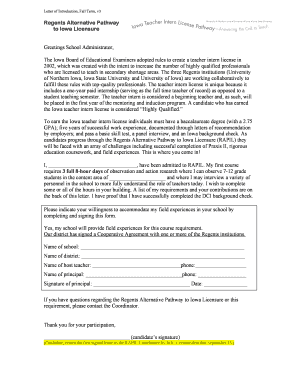
Get Lttr Intro I 24 Hours, Rapil V3.doc - Iowateacherintern
How it works
-

Open form follow the instructions
-

Easily sign the form with your finger
-

Send filled & signed form or save
How to use or fill out the Lttr Intro I 24 Hours, RAPIL V3.doc - Iowateacherintern online
This guide provides clear and comprehensive instructions for completing the Lttr Intro I 24 Hours, RAPIL V3.doc for the Iowateacherintern program. Users can easily navigate each section of the form with step-by-step guidance tailored to meet their needs.
Follow the steps to complete the form successfully.
- Click the ‘Get Form’ button to access the document. This will allow you to obtain the Lttr Intro I 24 Hours, RAPIL V3.doc and open it in your preferred editing tool.
- Begin by filling out your full name in the designated field labeled ‘I, _________________________________, have been admitted to RAPIL.’ This identifies you as the candidate pursuing the program.
- Indicate the content area of your observation under ‘where I can observe 7-12 grade students in the content area of _____________________.’ Specify the subject you intend to focus on.
- In the section that asks for the name of the school, fill in the name of the institution where you will be conducting your field experiences: ‘Name of school: _____________________________________________________________’.
- Complete the details for the school district under ‘Name of district: _____________________________________________________________.’ Make sure this is accurate to reflect your placement.
- Provide the name and contact information of your host teacher by filling in ‘Name of host teacher: _________________________________phone:___________________.’ This person will facilitate your experiences.
- Fill in the principal's name and phone number in the provided fields: ‘Name of principal: ____________________________________phone: __________________.’ This ensures clear communication regarding your internship.
- Obtain the principal's signature in the designated area: ‘Signature of principal: ____________________________________ Date: ________________.’ This signature signifies their support for your field experience.
- Lastly, after the principal has signed, ensure you sign at the bottom as the candidate, fulfilling your part of the documentation.
- Once all fields are completed, save your changes. You can choose to download, print, or share the completed form as needed.
To proceed with your application, fill out the necessary documents online swiftly and efficiently.
Industry-leading security and compliance
US Legal Forms protects your data by complying with industry-specific security standards.
-
In businnes since 199725+ years providing professional legal documents.
-
Accredited businessGuarantees that a business meets BBB accreditation standards in the US and Canada.
-
Secured by BraintreeValidated Level 1 PCI DSS compliant payment gateway that accepts most major credit and debit card brands from across the globe.