Loading
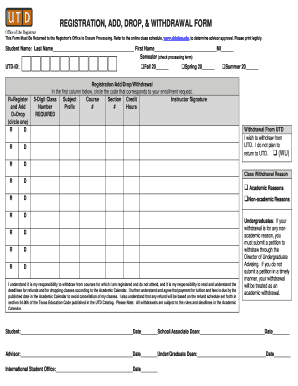
Get Registration, Add, Drop, & Withdrawal Form - Utdallas
How it works
-

Open form follow the instructions
-

Easily sign the form with your finger
-

Send filled & signed form or save
How to fill out the REGISTRATION, ADD, DROP, & WITHDRAWAL FORM - Utdallas online
Completing the Registration, Add, Drop, & Withdrawal Form at Utdallas is a straightforward process that ensures your enrollment requests are processed accurately. This guide will walk you through each section of the form step-by-step, providing helpful tips tailored to users' needs.
Follow the steps to properly complete the form.
- Press the ‘Get Form’ button to obtain the form and open it in your preferred editor.
- Begin by filling in your personal information. Clearly write your last name, first name, and middle initial in the designated fields to ensure accurate identification.
- Indicate the semester for processing by checking the appropriate box for Fall, Spring, or Summer. Be sure to enter the year in the provided space.
- Provide your UTD-ID number in the specified field, which helps the Registrar’s Office locate your records.
- In the first column of the registration section, circle the code corresponding to your enrollment request. You have the option to register/add or drop a class.
- Fill in the 5-digit class number, subject prefix, course number, section number, and credit hours for each course you are adding or dropping.
- If you wish to withdraw from UTD entirely, check the box indicating your intention and provide a reason for the withdrawal in the specified area.
- Acknowledge your responsibilities by reading the statement regarding withdrawal procedures and payment deadlines. Your signature and date are required at the bottom of the form.
- Finally, ensure that you obtain the necessary signatures from your advisor, school/associate dean, and the international student office if applicable. Once completed, save your changes appropriately.
Complete your forms online today to ensure a smooth enrollment experience.
Open enrollment begins Monday, April 5. Last day for registration is Thursday, May 20. Late registration and add/swap period is Friday, May 21 Wednesday, June 9.
Industry-leading security and compliance
US Legal Forms protects your data by complying with industry-specific security standards.
-
In businnes since 199725+ years providing professional legal documents.
-
Accredited businessGuarantees that a business meets BBB accreditation standards in the US and Canada.
-
Secured by BraintreeValidated Level 1 PCI DSS compliant payment gateway that accepts most major credit and debit card brands from across the globe.