Loading
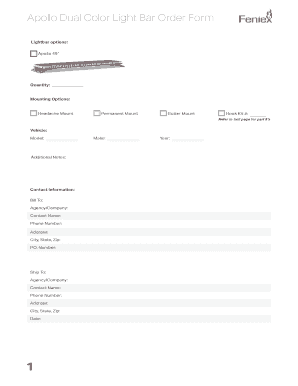
Get Apollo Dual Color Light Bar Order Form - Feniex
How it works
-

Open form follow the instructions
-

Easily sign the form with your finger
-

Send filled & signed form or save
How to fill out the Apollo Dual Color Light Bar Order Form - Feniex online
This guide provides a detailed overview of how to correctly fill out the Apollo Dual Color Light Bar Order Form - Feniex online. By following these steps, users can efficiently input their order details and ensure a smooth ordering process.
Follow the steps to complete your Apollo Dual Color Light Bar order form online.
- Click ‘Get Form’ button to obtain the form and open it in the editor.
- Select your preferred lightbar option by indicating the desired length, such as Apollo 49'. Make sure to specify the quantity needed.
- Choose the mounting option for the lightbar by selecting from the options provided: Headache Mount, Permanent Mount, or Gutter Mount.
- Provide vehicle information by entering the model of the vehicle in the designated field.
- In the 'Additional Notes' section, include any pertinent details or requests regarding your order.
- Fill out the 'Bill To' section by providing contact information for billing purposes. This includes the agency or company name, contact person's name, phone number, and full address (city, state, zip). Include a P.O. Number if applicable.
- Complete the 'Ship To' section with the relevant shipping information, mirroring the details required in the billing section.
- Choose the make and year of the vehicle in the respective fields to ensure compatibility with the lightbar model.
- Identify the appropriate hook kit number and enter it in the designated space.
- Once all fields are completed, review your entries for accuracy. After verification, you can save changes, download, print, or share the form as needed.
Start filling out your Apollo Dual Color Light Bar Order Form online today!