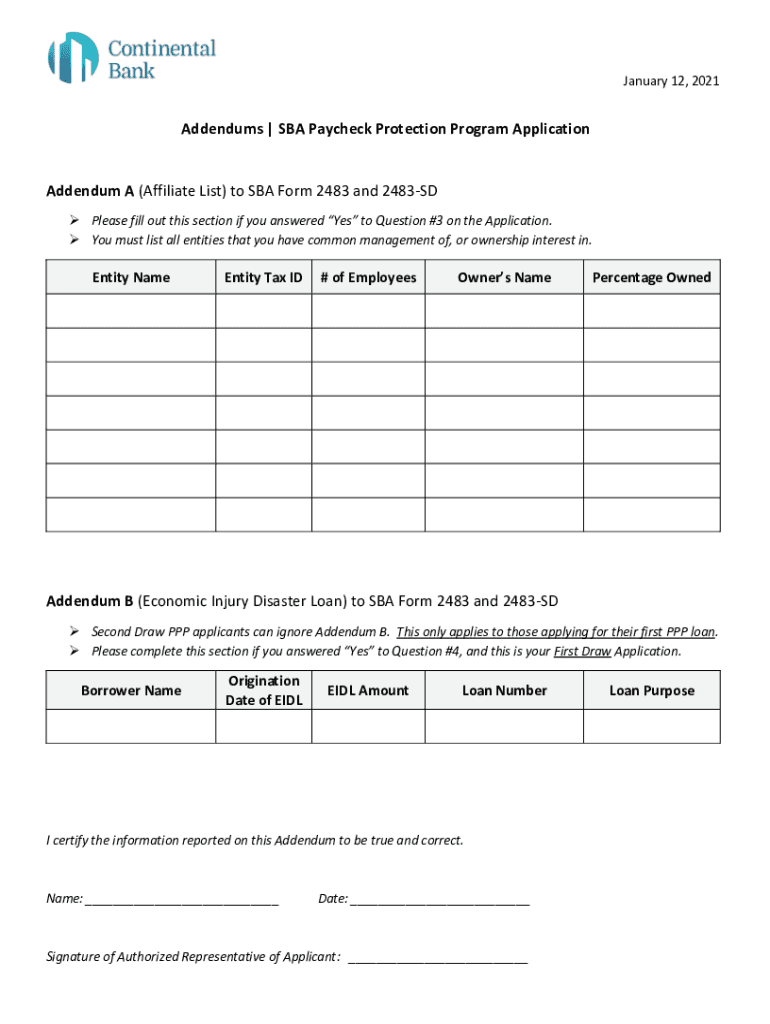
January 12, 2021Addendums SBA Paycheck Protection Program Application Addendum A (Affiliate List) to SBA Form 2483 and 2483SD ! Please fill out this section if you answered Yes to Question #3 on.
Loading

Open form follow the instructions

Easily sign the form with your finger

Send filled & signed form or save
How to fill out the To SBA Form 2483 And 2483-SD Addendum B online
Filling out the To SBA Form 2483 and 2483-SD Addendum B online requires careful attention to detail. This guide will walk you through each section of the form and provide helpful instructions to ensure accurate completion.
Follow the steps to successfully complete the forms online.
- Click ‘Get Form’ button to obtain the form and open it in the editor.
- Review the instructions on the form to ensure you meet the eligibility criteria before starting your application.
- Begin filling out the first section of the form with your personal or business information, including your legal name and address.
- If applicable, complete Addendum A by listing all entities you have common management of, or ownership interest in, by providing their names, tax IDs, number of employees, owner's names, and ownership percentages.
- Next, if you are applying for your First Draw Application, complete Addendum B by providing the Borrower Name, Origination Date of EIDL, EIDL Amount, and Loan Number.
- Ensure that you certify the information provided on the addendum is accurate by filling in your name, date, and providing the signature of the authorized representative.
- Once all sections are filled out correctly, review your application for accuracy and completeness.
- Finally, save any changes made to the form, download a copy for your records, print it if necessary, or share it as required.
Start completing your To SBA Form 2483 and 2483-SD Addendum B online now!
Experience a faster way to fill out and sign forms on the web. Access the most extensive library of templates available.
Related content
Mar 18, 2021 — Las solicitudes deben presentarse en inglés. Todos los siguientes...
Jan 15, 2021 — Forms. SBA Form 2483-SD: 2nd. Draw Application. SBA Form 2483: Applicant...
Get answers to your most pressing questions about US Legal Forms API.
What is the SBA Form 2483?
An Applicant that files an IRS Form 1040, Schedule C, and elects to calculate the PPP loan amount using net profit must use this form. An Applicant that files an IRS Form 1040, Schedule C, and elects to calculate the PPP loan amount using gross income cannot use this form, and instead must use SBA Form 2483-C.
What is a 2483 form?
SBA Form 2483 (3/21) Paycheck Protection Program. Borrower Application Form Revised March 18, 2021. Purpose of this form: This form is to be completed by the authorized representative of the Applicant and submitted to your SBA Participating Lender.
What is Addendum A on PPP loan?
ADDENDUM A = SBA FORM 2483 (AFFILIATION) Four tests for affiliation based on control apply to participants in the Paycheck Protection Program. For purposes of the determining the number of employees of an applicant to the Paycheck Protection Program, the applicant is considered together with its affiliates.
How do I know if my PPP loan is approved?
If you applied for your PPP loan via Womply, you can check loan application status at https://www.womply.com/ppp-status/. If you did not apply through Womply, you will need to contact your SBA-approved lender and request a status update.
What is Addendum B on PPP?
Addendum B SBA Economic Injury Disaster Loan. Information (only complete if applicant received an. SBA EIDL loan between January 31, 2020 and April 3, 2020 )
How long is PPP good for?
SBA will forgive loans if all employee retention criteria are met, and the funds are used for eligible expenses. PPP loans have an interest rate of 1%. Loans issued prior to June 5, 2020, have a maturity of two years. Loans issued after June 5, 2020, have a maturity of five years.
How do I fill out a second PPP loan?
Your business information. ... How to calculate your monthly payroll and your PPP loan amount. ... Find and fill in your PPP first-draw SBA loan number. ... Filling in the section on the 25 percent revenue reduction. ... Gross receipts. ... Time frames for the calculation.
What is a SBA Form 2483 C?
An Applicant that files an IRS Form 1040, Schedule C, and elects to calculate the PPP loan amount using gross income must use this form. An Applicant that files an IRS Form 1040, Schedule C, and elects to calculate the PPP loan amount using net profit must use SBA Form 2483.
Use professional pre-built templates to fill in and sign documents online faster. Get access to thousands of forms.
If you believe that this page should be taken down, please follow our DMCA take down process here.