Loading
Get Da Form 705 Apft Scorecard - Physical Readiness Training
How it works
-

Open form follow the instructions
-

Easily sign the form with your finger
-

Send filled & signed form or save
How to fill out the DA Form 705 APFT Scorecard - Physical Readiness Training online
The DA Form 705 APFT Scorecard is a crucial document for tracking physical readiness training results in the military. This guide provides comprehensive instructions on completing the scorecard efficiently and accurately online.
Follow the steps to complete the DA Form 705 APFT Scorecard online.
- Click 'Get Form' button to access the DA Form 705 APFT Scorecard and open it in the editor.
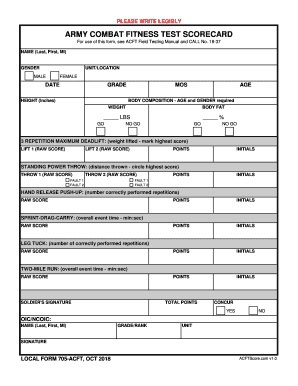
- Begin by entering the name of the individual in the format: Last name, First name, Middle initial. Ensure that all personal information is spelled correctly.
- Select the gender from the options provided: Male or Female. This information is required for body composition assessment.
- Fill in the unit and location where the individual is assigned. This helps in identifying and categorizing the scores accurately.
- Enter the date of the assessment in the appropriate field, and ensure you include the correct format for the date.
- Record the grade, height in inches, military occupational specialty (MOS), and age. Ensure the body composition section is accurately completed, including weight and body fat percentage.
- For the three-repetition maximum deadlift, enter each raw score achieved in the designated fields and mark the highest score. Calculate and input the corresponding points in the points field.
- In the standing power throw section, provide the distance thrown in the raw score fields and circle the highest score. Document any faults for each throw appropriately.
- For the hand release push-up section, record the number of correct repetitions performed and their corresponding points.
- Identify the time taken for the sprint-drag-carry event in minutes:seconds format, and record this as the raw score.
- Enter the number of correct repetitions for the leg tuck event and document the raw score.
- Input the overall time for the two-mile run in minutes:seconds format and document it as the raw score.
- Sign the scorecard in the soldier's signature field, verifying that the data recorded is accurate.
- Summarize the total points accumulated throughout the assessment and record them in the total points section.
- Confirm concurrence by selecting 'Yes' or 'No' as appropriate and complete the OIC/NCOIC section with the name, rank, unit, and signature of the approving officer.
- Review all entered data for accuracy and completeness before saving your changes. You may also choose to download, print, or share the completed scorecard.
Take the next step in managing your physical readiness training by completing your DA Form 705 APFT Scorecard online today.
Male recruits ages 17 to 21 have to do 42 push-ups, 53 sit-ups and a two-mile run in 15 minutes and 54 seconds or less. Women in the same age group have to complete 19 push-ups, 53 sit-ups and two miles of running in 18 minutes and 54 seconds or less.