Loading
Get New Client Intake Sheet For Elderly And Disable
How it works
-

Open form follow the instructions
-

Easily sign the form with your finger
-

Send filled & signed form or save
How to fill out the New Client Intake Sheet For Elderly And Disable online
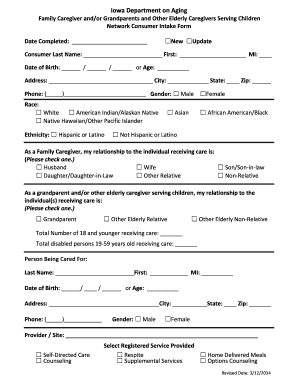
This guide will assist you in accurately completing the New Client Intake Sheet for Elderly and Disable online. Your careful attention to each section ensures that you provide the necessary information for proper processing and care support.
Follow the steps to fill out the New Client Intake Sheet accurately.
- Click ‘Get Form’ button to obtain the form and open it in the editor.
- Begin by entering the date you completed the form in the designated field.
- In the first section, fill in the consumer's last name, first name, and middle initial.
- Provide the consumer's date of birth or age in the respective fields.
- Complete the address section with the consumer's residential information including street, city, state, and zip code.
- Enter the consumer's phone number in the format provided.
- Select the consumer's gender by marking the appropriate box.
- Identify the consumer’s race and ethnicity by checking the relevant boxes.
- Fill in your relationship to the individual receiving care by checking the appropriate box.
- Count and enter the total number of children under 18 and disabled individuals aged 19-59 receiving care.
- In the 'Person Being Cared For' section, repeat steps 3 through 6 for the individual receiving care.
- Indicate the provider or site of care in the provided field.
- Select the type of service being provided by checking the relevant boxes.
- Review all entered information for accuracy before proceeding.
- Once completed, save your changes, and consider downloading or printing the document if necessary.
Start filling out the New Client Intake Sheet online today!
Questions to include in your new client intake form Your client's name, surname, and contact information (mobile number, email address, home address, website, etc) Information about your client's business and brand (if applicable) Your client's budget (if applicable)