Loading
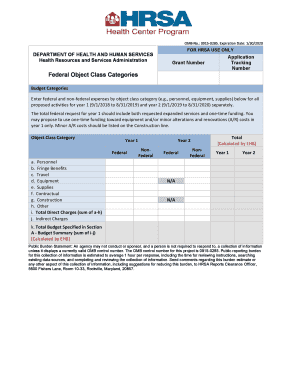
Get Federal Object Class Categories Form. Federal Object Class Categories Form
How it works
-

Open form follow the instructions
-

Easily sign the form with your finger
-

Send filled & signed form or save
How to fill out the Federal Object Class Categories Form online
Filling out the Federal Object Class Categories Form is essential for the accurate reporting of federal and non-federal expenses. This guide aims to provide clear, step-by-step instructions on completing each section of the form to ensure a smooth process.
Follow the steps to accurately complete the form.
- Press the ‘Get Form’ button to access the Federal Object Class Categories Form and open it in your preferred editor.
- Begin by entering the Grant Number at the designated field. This number is essential for tracking your application.
- Locate the Application Tracking Number field and fill it in. This number will help in monitoring the status of your form.
- In the Budget Categories section, specify the federal and non-federal expenses by object class for each proposed activity for Year 1 and Year 2 separately. Ensure each category (personnel, equipment, supplies, etc.) is filled accurately.
- For Year 1, enter the federal request that combines both expanded services and any one-time funding. Make sure to propose any one-time funding for equipment or minor alterations and renovations costs specifically for Year 1.
- Complete the Object Class Category for both years by filling in respective fields: 'Personnel', 'Fringe Benefits', 'Travel', 'Equipment', 'Supplies', 'Contractual', 'Construction', 'Other' for funding sources, ensuring all values are calculated correctly.
- Once all sections are completed, check that the Total Direct Charges (sum of a-h) and Indirect Charges are correctly displayed as per the calculations.
- Finally, review the Total Budget specified in Section A. This should reflect the sum of the Direct Charges and Indirect Charges for both years. Make sure all entries are verified.
- Once you are satisfied with all entries, you can save changes, download the form, or print it for your records. Ensure to keep a copy for your submission.
Get started on completing your Federal Object Class Categories Form online today!
Budget Object Class (BOC) Code – The lowest level of object class. BOC codes are required on all spending transactions to classify obligations and expenditures ing to the nature of the services or items purchased.
Industry-leading security and compliance
US Legal Forms protects your data by complying with industry-specific security standards.
-
In businnes since 199725+ years providing professional legal documents.
-
Accredited businessGuarantees that a business meets BBB accreditation standards in the US and Canada.
-
Secured by BraintreeValidated Level 1 PCI DSS compliant payment gateway that accepts most major credit and debit card brands from across the globe.