Loading
Get Laptop Inspection Checklist
How it works
-

Open form follow the instructions
-

Easily sign the form with your finger
-

Send filled & signed form or save
How to fill out the Laptop Inspection Checklist online
Completing the Laptop Inspection Checklist online is essential for ensuring the proper documentation of the laptop's condition. This guide will provide you with clear and supportive instructions for each section of the checklist.
Follow the steps to complete the checklist effectively.
- Click 'Get Form' button to obtain the form and open it in your editing interface.
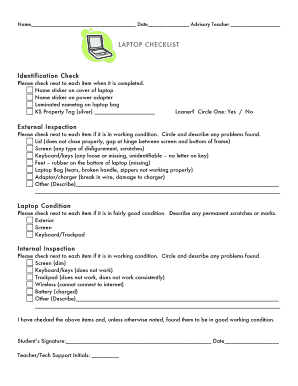
- Begin by filling out the identification check section. Ensure that you place a checkmark next to each completed item such as the name sticker on the laptop cover and power adapter, as well as any required nametags and property tags.
- In the loaner field, indicate whether this is a loaner laptop by circling 'Yes' or 'No'.
- Proceed to the external inspection section. Check off items that are in working condition and circle any problems found. For each item, provide a brief description of any issues, such as the screen’s disfigurement or any missing keys.
- In the laptop condition section, check off items that are in fairly good condition and document any permanent marks or scratches present.
- Move on to the internal inspection section. Again, check off the items that are functioning correctly and circle those that have problems, providing descriptions similar to what you did in the external inspection.
- The checklist requires a signature for acknowledgment. Have the student sign and date the form, followed by the teacher or tech support initials.
- Finally, review your entries for accuracy. Once completed, you can save your changes, download the form, print it, or share it as necessary.
Start filling out your Laptop Inspection Checklist online today for efficient documentation.
Once a year should be good for most computers. But, if your computer is starting to run a little slow a quick tune-up or clean-up can go a long way to speed things up. Typically having your computer serviced will get it running like new.