Loading
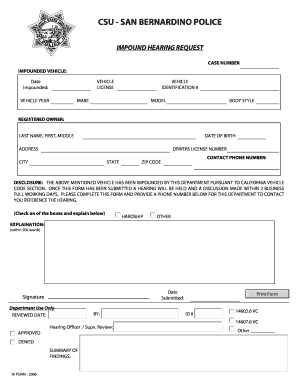
Get San Bernardino Impounded Vehicle
How it works
-

Open form follow the instructions
-

Easily sign the form with your finger
-

Send filled & signed form or save
How to fill out the San Bernardino Impounded Vehicle online
This guide provides clear and detailed instructions on how to fill out the San Bernardino Impounded Vehicle form online. By following these steps, users can ensure that they complete the form accurately and efficiently.
Follow the steps to fill out the form correctly.
- Click ‘Get Form’ button to access the impounded vehicle form and open it in your preferred document editor.
- Enter the case number associated with the impounded vehicle in the designated field.
- Fill in the impounded vehicle's details: enter the date it was impounded, as well as the vehicle's license number, year, identification number, make, and model.
- Provide the registered owner's information, including their last name, first name, middle name, date of birth, address, city, state, zip code, and driver's license number.
- Input the contact phone number for the registered owner, ensuring that it is a valid number for communication purposes.
- Indicate the hardship or other reason by checking the appropriate box and provide a detailed explanation in the space provided, keeping it within the 500-word limit.
- Review all entered information carefully to ensure accuracy before submitting the form.
- Once satisfied with the information, save the changes, download or print the completed form for your records, or share it as necessary.
Complete your documents online to streamline the impound hearing process.
The average daily storage rate for each official police garage is $42.50. So, for instance, if your impounded vehicle gets stored at your local official police garage for two days, you will have to pay $85 in storage fees to retrieve it.