Loading
Form preview
  • US Legal Forms
  • Form Library
  • More Forms
  • More Multi-State Forms
  • One Point Lesson Format In Excel Download

Get One Point Lesson Format In Excel Download

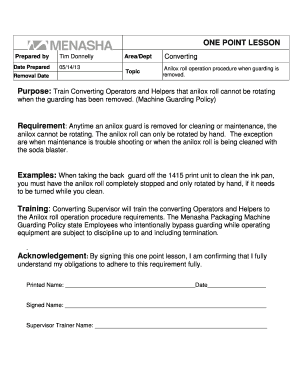
ONE POINT LESSON Prepared by Date Prepared Removal DateTim Donnelly 05/14/13Area/Dept TopicConverting Anilox roll operation procedure when guarding is removed.Purpose: Train Converting Operators and.

How it works

  1. Open form

    Open form follow the instructions

  2. Easily sign form

    Easily sign the form with your finger

  3. Share form

    Send filled & signed form or save

How to use or fill out the One Point Lesson Format In Excel Download online

Filling out the One Point Lesson Format can help ensure that employees understand crucial operational procedures. This guide provides clear steps to effectively complete the form online, ensuring all necessary components are addressed.

Follow the steps to complete the One Point Lesson Format effectively.

  1. Press the ‘Get Form’ button to access the document and open it in your preferred online editor.
  2. In the 'Prepared by' section, enter the name of the person responsible for the lesson. This could be the supervisor or trainer assigned to convey the information.
  3. Input the 'Date Prepared' in the specified format to indicate when the lesson was created. This ensures that the information is timely and relevant.
  4. Specify the 'Area/Dept' where the lesson applies. This identifies the relevant team or department that the training is meant for.
  5. Fill out the 'Topic' section. Describe the procedure in a concise manner, e.g., 'Anilox roll operation procedure when guarding is removed.'
  6. Provide a clear 'Purpose' statement that outlines the intent of the lesson. This should explain the significance of adhering to operational procedures.
  7. Detail the 'Requirement' section, stating the necessary actions to take when the guard is removed. This clarifies safety measures for users.
  8. Give specific 'Examples' to illustrate scenarios in which the procedure applies. This assists in visualizing the instructional content.
  9. Outline the 'Training' process. Specify who will provide training and reinforce responsibilities related to the procedure.
  10. Include an 'Acknowledgment' section where users can confirm their understanding of the procedures by signing their printed name, signature, and date.
  11. Once all sections are filled out, you can save your changes, download the document, print it for records, or share it with relevant stakeholders.

Begin completing your One Point Lesson Format online today to enhance training and safety in your workplace.

Get form

Experience a faster way to fill out and sign forms on the web. Access the most extensive library of templates available.
Get form

Related content

[XLS] Lessons Learned Log Template - A.cdc.gov
4, A, ID: A unique ID number used to identify the lesson learned in the lesson learned...
Learn more
Microsoft Excel for Beginners
Jan 16, 2018 — 2.0 hours. This is a basic computer workshop. Microsoft Excel is a...
Learn more
Free Google Classroom for Teachers Cheat Sheet
For example, label classes with the term or year, and assign a number value to...
Learn more

Related links form

Manitoba Home Care Program Care Assessment Form Luton BC 2010 Regularisation - Luton Borough Council Create A COAT OF ARMS 0001 800-222-2062 - National Benefit Life Insurance

Questions & Answers

Get answers to your most pressing questions about US Legal Forms API.

Contact support

There are four main types of one point lessons: basic knowledge, safety, problem case study, and improvement case study.

The OPL (“Object Per Line”) format was created to allow easy access to and manipulation of OpenStreetMap data with typical UNIX command line tools such as grep , sed , and awk , or typical scripting languages such as Python, Ruby or Perl. It is also great for writing compact test cases.

There are 3 types of OPL: Basic information sheet. Providing practical know-how of components, machines, method and maintenance. Problem case study sheet. Educating tackling of an actual problem that had happened in the past. Kaizen lesson. How productivity and quality can be improved in small continual steps.

What is an One Point Lesson (OPL)? A one point lesson is a short visual work instruction in A4 format. An OPL helps convey the expectations of a process, solve problems, bridge a knowledge gap or improve a way of working in a process.

More and more companies are making one point lessons as part of their continuous improvement work (LEAN). A one point lesson (OPL) is a simple, visual and often pointwise description of a task. This means a standard which describes how a task should be performed.

Types of OPL Information OPL: Shares essential basic information that is required to effectively perform an operation. For example, how to clean an area, how to change the setup, change filters, lubricate, etc.

Single-point Lessons: An In-depth Look Single-point lessons should contain a single theme to be learned. The shared information should fit on one page. Single-point lessons should contain more visuals than text. Text should be straightforward, easy to understand and to the point.

Get This Form Now!

Use professional pre-built templates to fill in and sign documents online faster. Get access to thousands of forms.
Get form
If you believe that this page should be taken down, please follow our DMCA take down processhere.
Get One Point Lesson Format In Excel Download
Get form
  • Adoption
  • Bankruptcy
  • Contractors
  • Divorce
  • Home Sales
  • Employment
  • Identity Theft
  • Incorporation
  • Landlord Tenant
  • Living Trust
  • Name Change
  • Personal Planning
  • Small Business
  • Wills & Estates
  • Packages A-Z
  • Affidavits
  • Bankruptcy
  • Bill of Sale
  • Corporate - LLC
  • Divorce
  • Employment
  • Identity Theft
  • Internet Technology
  • Landlord Tenant
  • Living Wills
  • Name Change
  • Power of Attorney
  • Real Estate
  • Small Estates
  • Wills
  • All Forms
  • Forms A-Z
  • Form Library
  • Legal Hub
  • About Us
  • Help Portal
  • Legal Resources
  • Blog
  • Affiliates
  • Contact Us
  • Delete My Account
  • Site Map
  • Industries
  • Forms in Spanish
  • Localized Forms
  • State-specific Forms
  • Forms Kit
  • Real Estate Handbook
  • All Guides
  • Notarize
  • Incorporation services
  • For Consumers
  • For Small Business
  • For Attorneys
  • USLegal
  • FormsPass
  • pdfFiller
  • signNow
  • altaFlow
  • DocHub
  • Instapage
Form Packages
  • Adoption
  • Bankruptcy
  • Contractors
  • Divorce
  • Home Sales
  • Employment
  • Identity Theft
  • Incorporation
  • Landlord Tenant
  • Living Trust
  • Name Change
  • Personal Planning
  • Small Business
  • Wills & Estates
  • Packages A-Z
Form Categories
  • Affidavits
  • Bankruptcy
  • Bill of Sale
  • Corporate - LLC
  • Divorce
  • Employment
  • Identity Theft
  • Internet Technology
  • Landlord Tenant
  • Living Wills
  • Name Change
  • Power of Attorney
  • Real Estate
  • Small Estates
  • Wills
  • All Forms
  • Forms A-Z
  • Form Library
Customer Service
  • Legal Hub
  • About Us
  • Help Portal
  • Legal Resources
  • Blog
  • Affiliates
  • Contact Us
  • Delete My Account
  • Site Map
  • Industries
  • Forms in Spanish
  • Localized Forms
  • State-specific Forms
  • Forms Kit
Legal Guides
  • Real Estate Handbook
  • All Guides
Prepared for you
  • Notarize
  • Incorporation services
Our Customers
  • For Consumers
  • For Small Business
  • For Attorneys
Our Sites
  • USLegal
  • FormsPass
  • pdfFiller
  • signNow
  • altaFlow
  • DocHub
  • Instapage
Social Media
Call us now toll free:
+1 833 426 79 33
As seen in:
© Copyright 1999-2026 airSlate Legal Forms, Inc. 3720 Flowood Dr, Flowood, Mississippi 39232
  • Your Privacy Choices
  • Terms of Service
  • Privacy Notice
  • Content Takedown Policy
  • Bug Bounty Program