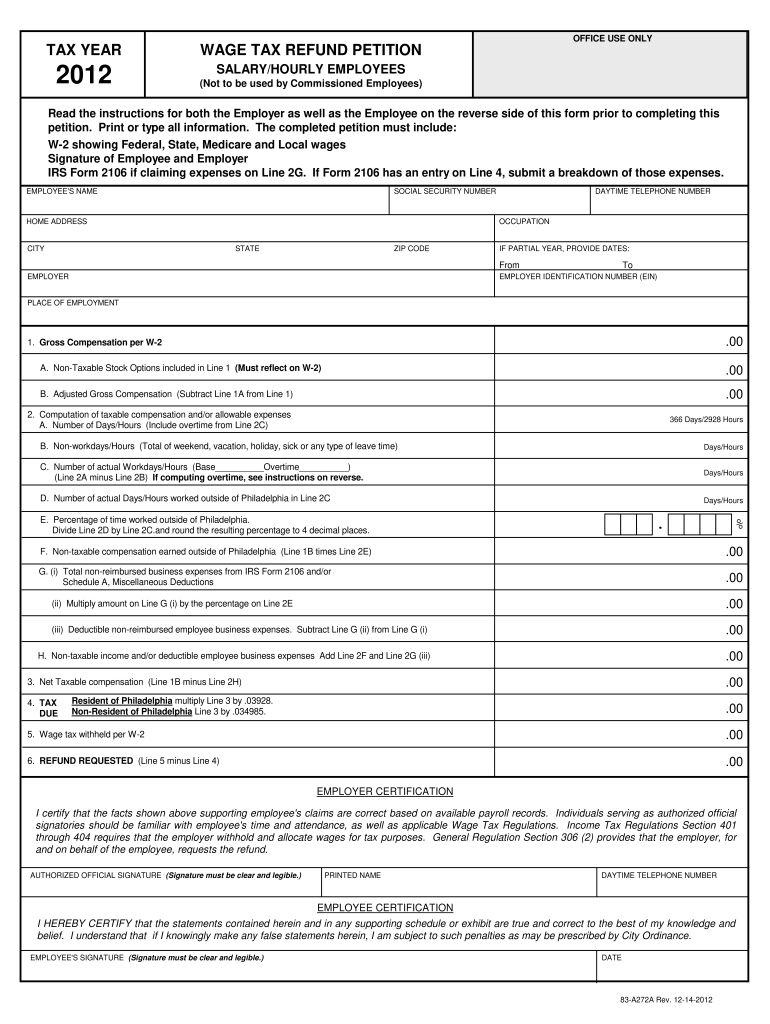
E any false statements herein, I am subject to such penalties as may be prescribed by City Ordinance. EMPLOYEE'S SIGNATURE (Signature must be clear and legible.) DATE 83-A272A Rev. 12-14-2012 INSTRUCTIONS FOR FILING WAGE TAX REFUND PETITION (Salary and Hourly Employees Only) You must attach the applicable W-2 indicating Federal, Medicare, State and Local wages to the petition. A separate petition must be filed for each W-2 issued by employers that may have overwithheld Wage Tax. 2012 TAX RAT.
Loading

Open form follow the instructions

Easily sign the form with your finger

Send filled & signed form or save
How to fill out the Tax Refund Philadelphia online
Navigating the Tax Refund Philadelphia form can be straightforward with the right guidance. This comprehensive guide provides step-by-step instructions to help users complete their petitions for tax refunds confidently and accurately.
Follow the steps to successfully complete your petition.
- Press the ‘Get Form’ button to retrieve the Tax Refund Philadelphia form and open it in your preferred editing tool.
- Begin filling in the employee's name, social security number, home address, and daytime telephone number. Ensure all information is printed clearly or typed.
- Input the occupation of the employee, and complete the section regarding the employer's details, including the employer identification number (EIN) and place of employment.
- For gross compensation, enter the figures from the W-2 form. Include any non-taxable stock options on Line 1A, if applicable.
- Calculate adjusted gross compensation by subtracting any non-taxable stock options from Line 1.
- In the computation section, detail the number of days or hours worked, including any overtime if applicable. Ensure to differentiate between workdays and non-workdays.
- If applicable, calculate the percentage of time worked outside of Philadelphia and any non-taxable compensation related to that work.
- For any claimed expenses, ensure to attach the necessary IRS Form 2106 or Schedule A as evidence.
- Complete the tax calculation by determining the tax due based on residency status and the applicable tax rates.
- Fill in the wage tax withheld section and calculate the total refund requested.
- Ensure both the employer and employee sign the petition, with clear and legible signatures before submission.
- Once all fields are completed, save your changes and download the form for submission. You may print or share the document as needed.
Complete your Tax Refund Philadelphia form online today and ensure you secure your potential refund!
Experience a faster way to fill out and sign forms on the web. Access the most extensive library of templates available.
Related content
Mar 11, 2021 — Philadelphia employers are required to give an income-based Wage Tax...
... of Philadelphia and who are required to work at various times outside of Philadelphia...
Comptroller of the Treasury of Maryland v. Wynne, 575 U.S. 542 (2015), is a 2015 U.S....
Get answers to your most pressing questions about US Legal Forms API.
How can I check where's my tax return?
Using the IRS Where's My Refund tool. Viewing your IRS account information. Calling the IRS at 1-800-829-1040 (Wait times to speak to a representative may be long.) Looking for emails or status updates from your e-filing website or software.
How do I claim my Philadelphia wage tax back?
Philadelphia employers are required to give an income-based Wage Tax refund petition form to employees by February 1. In most cases, employers provide the refund petition at the same time they provide employee W-2's or comparable forms. Anyone can also download a copy of the form.
How can I get my Philadelphia 2020 income tax refund?
A form that businesses can use to request a refund on behalf of a group of their non-resident employees. ... An online COVID EZ refund form.
How do I claim tax back myself?
The quickest, easiest and most convenient way to claim your tax back is online, using PAYE Services in myAccount, or through RevApp (a free mobile app, provided by Revenue, to help you manage your tax affairs on the go). If you are not already registered for myAccount, you can register on the Revenue website.
Where is my Philadelphia Tax Refund?
(215) 686-6574.
Can you claim back PAYE tax?
In most cases you can get back the tax you have overpaid, as long as you claim on time. ... Remember, even if you only want HMRC to look at one particular tax year, HMRC may take the opportunity to look over the four 'open' tax years. Therefore, you should review your position for all four tax years before contacting HMRC.
Where is my Philadelphia tax return?
All 2020 refund forms should be available on the city's website: www.phila.gov/revenue/tax-forms. If you have questions, email refund.unit@phila.gov or call at (215) 686-6574; -6575 or -6578.
Do I need to file a Philadelphia tax return?
When no Wage Tax is withheld, Philadelphia residents must file and pay the Earnings Tax themselves. ... Residents of Philadelphia who are employed out-of-state may be required to file and pay a local income tax in that jurisdiction in addition to the Philadelphia Earnings Tax.
Is there a Philadelphia tax return?
Important update: Philadelphia taxpayers now have until May 17, 2021, to file and pay their 2020 Earnings Tax without interest or penalties.
Where is my Pa tax refund?
Check the status of your Pennsylvania state refund online at https://www.doreservices.state.pa.us/PITServices/WheresMy/Refund. Services for taxpayers with special hearing and/or speaking needs are available by calling 1-800-447-3020 (TT). ... You can continue to check your refund status online.
Use professional pre-built templates to fill in and sign documents online faster. Get access to thousands of forms.
If you believe that this page should be taken down, please follow our DMCA take down process here.