Loading
Get Bausch Health Pap
How it works
-

Open form follow the instructions
-

Easily sign the form with your finger
-

Send filled & signed form or save
How to fill out the Bausch Health Pap online
This guide provides clear and concise instructions for completing the Bausch Health Patient Assistance Program application online. Our step-by-step breakdown ensures you can navigate the form with ease, understanding each section thoroughly.
Follow the steps to successfully complete your application.
- Press the ‘Get Form’ button to access the Bausch Health Pap and open it in your designated editor.
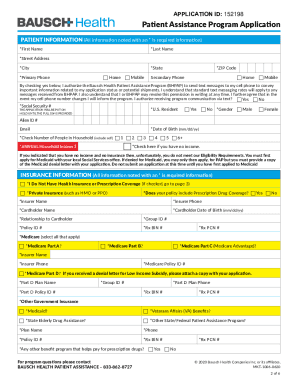
- Begin with the Patient Information section. Fill in all required fields marked with an asterisk, including first name, last name, street address, city, state, ZIP code, primary phone number, and social security number.
- In the Insurance Information section, indicate whether you have health insurance or prescription coverage. If you check ‘I Do Not Have Health Insurance or Prescription Coverage,’ proceed to page 3.
- Complete the Patient Authorization and Certification on page 3 by reading the consent statements thoroughly and signing where indicated. Be sure to provide an accurate date.
- Ensure your prescriber completes the necessary sections on pages 4 through 6, which includes documenting the product selection and signing the Prescriber Certification.
- Attach a copy of your medical and prescription insurance cards, ensuring that both the front and back are included to avoid your application being deemed incomplete.
- Review the form to confirm that all required fields are filled out and all necessary documentation is attached.
- Once you are satisfied with the information provided, save your changes and select an option to download, print, or share your completed application.
Complete your application online today to ensure you receive the assistance you need.
Bausch + Lomb was a public company listed on the NYSE, until it was acquired by private equity firm Warburg Pincus in 2007.