Loading
Get Constancia De Trabajo Doc
How it works
-

Open form follow the instructions
-

Easily sign the form with your finger
-

Send filled & signed form or save
How to fill out the Constancia De Trabajo Doc online
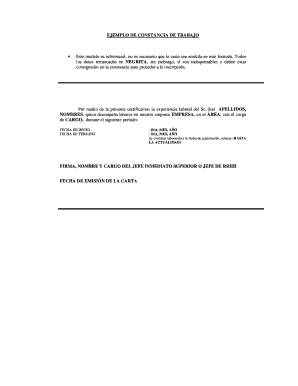
Filling out the Constancia De Trabajo Doc is an essential step for users seeking to certify their work experience. This guide provides clear, step-by-step instructions to help you complete the form accurately and efficiently.
Follow the steps to complete the Constancia De Trabajo Doc.
- Click the ‘Get Form’ button to access the Constancia De Trabajo Doc and open it in the online editor.
- Begin by entering the individual's last name and first name in the designated fields. Ensure that the names are spelled correctly, as they will appear in the certification.
- Next, fill out the company name where the individual is employed. This should reflect the official name of the organization.
- In the area section, specify the department or unit where the individual works. This is important for context regarding their employment.
- Detail the position held by the individual in the corresponding role field. Be precise so that the job title accurately represents their duties.
- Input the start date of employment in the start date field. Format it clearly, specifying day, month, and year.
- Enter the end date of employment in the end date field. If the individual is still employed, write 'up to the present date' instead.
- Conclude by adding the signature, name, and position of the immediate supervisor or HR manager in the relevant fields.
- Finally, input the date the letter is issued. Ensure that the date aligns with the current context of the certification.
- Once all fields are completed, you can save your changes. The form can also be downloaded, printed, or shared as needed.
Complete your documents online today for a seamless processing experience.
¿De qué forma se obtiene una constancia laboral? Informa a tu jefe o empleador previo que deseas obtener el documento. Si se presenta alguna demora, comunícate con la persona encargada de emitir la constancia. De igual forma, cerciórate de que los datos sean apropiados y que contenga la firma del director de la empresa.