Loading
Get Red Robin Giving Fund
How it works
-

Open form follow the instructions
-

Easily sign the form with your finger
-

Send filled & signed form or save
How to fill out the Red Robin Giving Fund online
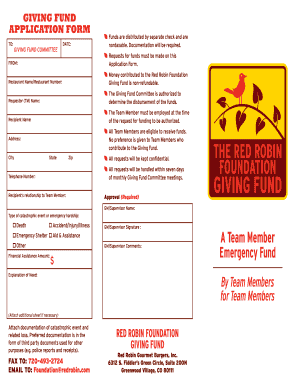
The Red Robin Giving Fund application form is designed to assist Red Robin Team Members facing financial emergencies due to catastrophic events. This guide provides comprehensive, step-by-step instructions on how to accurately complete the online application.
Follow the steps to complete your application form easily.
- Press the ‘Get Form’ button to access the application form and open it in your preferred document editor.
- Fill in the 'Restaurant Name/Restaurant Number' field to identify the location of the requesting team member. Ensure the information is accurate to facilitate the processing of your request.
- Input the 'Requestor Name' which should be the name of the Team Member making the application. This is essential for tracking the request.
- Provide the 'Recipient Name' of the person who will receive the funds. This should be filled with care as it is a key factor in the approval process.
- Complete the address section by providing the recipient's address, city, state, and zip code to ensure correct communication regarding the application.
- Enter the 'Telephone Number' of the recipient for direct contact regarding the application status or any required clarifications.
- Describe the recipient's relationship to the Team Member in the designated field. This should clarify how the individuals are connected.
- Select the type of catastrophic event or emergency hardship from the available options such as death, accident/injury/illness, emergency shelter, aid & assistance, or other.
- Specify the 'Financial Assistance Amount' requested, noting the maximum limit of $5,000. Be sure this reflects the need presented.
- Obtain the 'GM/Supervisor Signature' to validate the request. This approval is crucial for processing the application.
- In the 'GM/Supervisor Comments' section, provide any relevant context or additional information that could support the request.
- Write an 'Explanation of Need' that details the circumstances leading to the financial request. Be as thorough as possible to aid the committee’s understanding.
- If necessary, attach documentation supporting the catastrophic event and related loss. Ensure this includes appropriate third-party documents.
- After completing the form, you can save any changes, download, print, or share the document as needed, ensuring that all requested documentation is submitted.
Complete your Red Robin Giving Fund application online today to receive the support you need.