Loading
Get Westpac Pfi001 2012-2026
How it works
-

Open form follow the instructions
-

Easily sign the form with your finger
-

Send filled & signed form or save
How to fill out the Westpac PFI001 online
Filling out the Westpac PFI001 form is an essential step in applying for a loan with Westpac. This guide provides you with clear, step-by-step instructions to help you navigate through the online form efficiently and accurately.
Follow the steps to complete your Westpac PFI001 online.
- Click ‘Get Form’ button to obtain the form and open it in the editor.
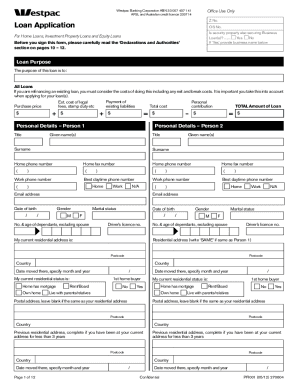
- Begin by filling out your personal information. Provide your title, surname, given name(s), date of birth, and contact information in the Personal Details section for Person 1. If there's a second person applying, repeat this for Person 2.
- Indicate your marital status and provide details about any dependents. Ensure you use people-first language while filling out these fields.
- In the Employment Details section, specify your job title, employer's name, employment type (full-time/part-time), and contact details. This should be filled out for both Person 1 and Person 2.
- Complete the Financial Details section by providing gross annual income, monthly income, and details of expenses for both applicants. It's important to list all sources of income.
- If applicable, describe any significant changes in financial situation that might affect your ability to repay the loan. This section is critical for the lender to assess your application.
- List all assets and liabilities in the respective sections. Be thorough and accurate, as this information is essential for calculating your financial position.
- Review all the filled sections carefully to ensure accuracy and completeness before proceeding.
- Once satisfied with all provided information, save your changes, and download or print the document if needed. Ensure to share the form as required for the application process.
Start filling out your Westpac PFI001 online today for a smoother loan application process.
Activating your new Westpac account is a simple process. You can do this online, via the Westpac mobile app, or by visiting a branch. Just follow the instructions provided in your welcome email or on your new card. Once activated, you can easily manage your account, including any Westpac PFI001 loans or services connected with it.