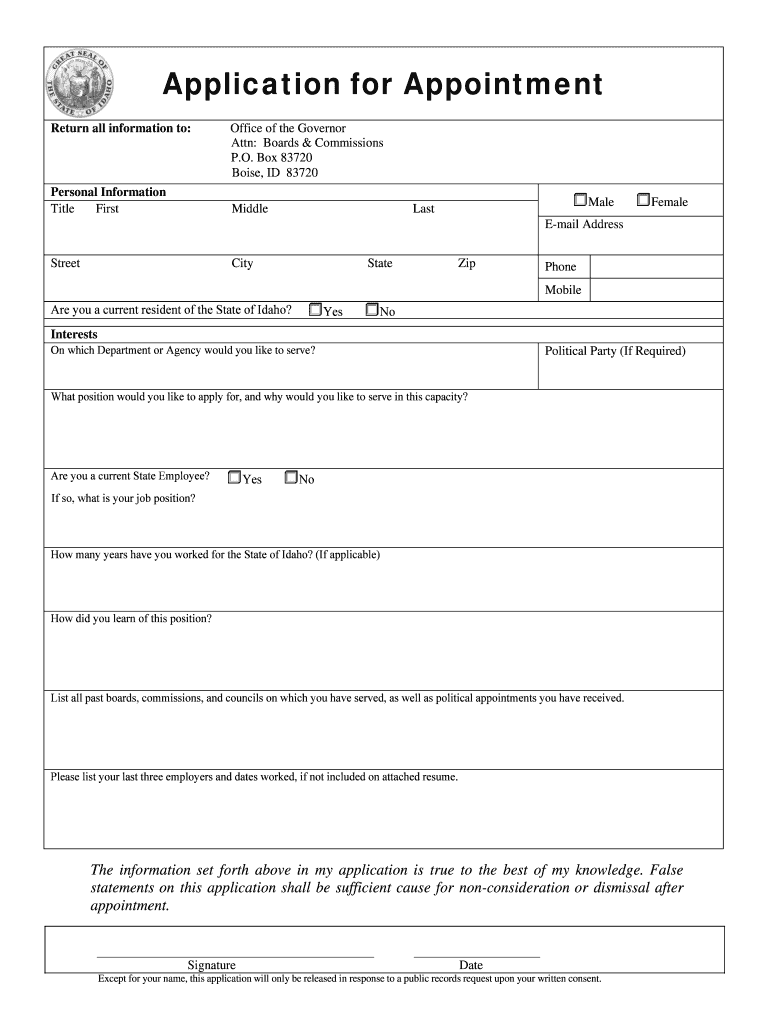
Application for Appointment Return all information to:Personal Information Title FirstOffice of the Governor Attn: Boards & Commissions P.O. Box 83720 Boise, ID 83720 MiddleMaleLastFemaleEmail.
Loading

Open form follow the instructions

Easily sign the form with your finger

Send filled & signed form or save
How to fill out the ID Application For Appointment online
This guide provides clear, step-by-step instructions for completing the ID Application For Appointment online. Following these directions will help ensure that your application is filled out accurately and submitted successfully.
Follow the steps to complete your ID application efficiently
- Press the ‘Get Form’ button to access the ID Application For Appointment and open it in your device's preferred editor.
- Begin by entering your personal information. Fill in your title, first name, middle name, and last name. Select your sex by checking either 'Male' or 'Female'.
- Provide your email address, home street address, city, state, and zip code. Additionally, include your mobile and home phone numbers.
- Indicate whether you are a current resident of the State of Idaho by checking 'Yes' or 'No'.
- Specify the department or agency you wish to serve. If required, indicate your political party affiliation.
- Describe the position you are applying for and explain your reasons for wanting to serve in this capacity.
- State whether you are a current state employee by selecting 'Yes' or 'No'. If applicable, provide your job position and the number of years you have worked for the State of Idaho.
- Indicate how you learned about this position.
- List all past boards, commissions, and councils on which you have served, including any political appointments.
- If not detailed in an attached resume, please provide your last three employers and the dates you worked at each.
- Review the statement asserting the truthfulness of your application. Sign and date the application.
- Complete any additional sections, including the Authorization for Background Check, where you will provide personal sex, alias names, date of birth, driver’s license number, and addresses for the past five years.
- Address any conflicts of interest by detailing any perceived or actual conflicts related to the position you are seeking.
- List any criminal offenses you have been convicted of, indicating the approximate date, city, state, and nature of the offense.
- Again, review the statement of truthfulness and authorize the investigation of the information provided by signing and dating this section.
- Once you have completed the form, save your changes, and consider downloading or printing for your records. Ensure to share or submit it as required.
Complete your application online today to ensure your submission is processed efficiently.
Experience a faster way to fill out and sign forms on the web. Access the most extensive library of templates available.
Related content
Visit a DMV Office. Check wait times before you go and bring your application confirmation...
UVA Health ID Card Employees and students of the Medical Center, University Physicians...
B. Application. A “Statement of Appointment” form covers the support of an individual...
Get answers to your most pressing questions about US Legal Forms API.
Can I get a California ID online?
Driver's License / ID Card Application. This online driver's license and ID card application saves you time by letting you complete the application before visiting a DMV field office. When you arrive, DMV employees can quickly access your completed form and begin to process it.
Where can I get Idnyc?
New Yorkers can sign up for an IDNYC card at several city locations, including two branches of The New York Public Library Bronx Library Center or Grand Central Library. The cards will either be mailed to their homes or can be picked up from the sign-up location if the applicant does not have a home address.
How do I get a Florida ID card?
Gather documents that verify their identity, Social Security Number, U.S. citizenship or lawful presence status, and proof of Florida residency. Apply in person at any driver license office and bring the required documents and fees.
How do I get a NYC ID?
Proof of your identity: at least three (3) points. Proof of where you live: one (1) point. At least one (1) of your documents much have your photo. At least one (1) document with your date of birth.
Can I transfer my drivers license to Florida online?
Schedule an Appointment to Transfer Your License to Florida You can schedule online using the Online Appointment Service and Information System (OASIS). Appointments fill fairly quickly, especially in high traffic locations, so you'll want to book about a week or two in advance.
How do I get a NYC ID online?
Fill out the online application form. Use the new IDNYC Document List to select the documents you are going to bring to the enrollment center. The IDNYC Document List will let you know when you have met the identity and residency document requirements.
What documents are needed for NYC ID?
IDNYC Applicant Document Guide. You must meet the following criteria to apply for an IDNYC card: 1. ... BELOW IS A LIST OF THE DOCUMENTS YOU CAN USE TO APPLY FOR YOUR IDNYC CARD. ... Four (4) Point Documents - Proof of Identity & Residency. ... Three (3) Point Documents - Proof of Identity. U.S. Passport or U.S. Passport Card.
Can you renew Florida ID card online?
If you are eligible to renew or replace your Florida ID card online, go to GoRenew.com and follow the on-screen directions. You will need to enter your social security number, which the FDHSMV will verify before a new card is issued.
How do I make an appointment for a real ID in California?
Appointments can be made online by visiting www.dmv.ca.gov or by calling 1-800-777-0133.
What documents do you need for a Florida ID?
Federal and State law requires proof of identity, Social Security number, and two (2) proofs of residential address for a Florida driver license or ID card. Click here for a handy checklist of required documents.
Use professional pre-built templates to fill in and sign documents online faster. Get access to thousands of forms.
If you believe that this page should be taken down, please follow our DMCA take down process here.