Loading
Get Fake Direct Deposit Statement
How it works
-

Open form follow the instructions
-

Easily sign the form with your finger
-

Send filled & signed form or save
How to fill out the Fake Direct Deposit Statement online
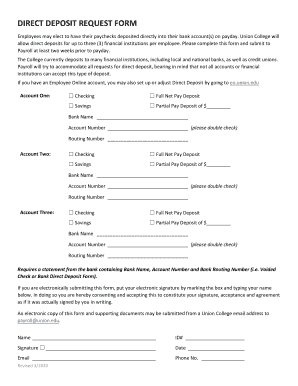
Completing the Fake Direct Deposit Statement online is a seamless process that allows users to easily manage their direct deposit preferences. This guide provides clear, step-by-step instructions to ensure accurate submission for hassle-free payroll deposits.
Follow the steps to successfully complete the form
- Press the ‘Get Form’ button to access the direct deposit statement and open it in your online editor.
- Begin by selecting your preferred bank account type for Account One. You can choose either Checking or Savings. Then indicate if you would like to deposit your full net pay or if you prefer a partial pay deposit. If selecting partial, specify the amount in the designated field.
- Fill in the bank name, account number, and routing number for Account One. Ensure that these details are accurate, as any errors could affect your deposits.
- Repeat the process for Account Two and Account Three, if applicable. Choose the account type, deposit preference, and input the relevant banking details for each account.
- If required, attach a statement from your bank that includes the Bank Name, Account Number, and Bank Routing Number. Acceptable documents include a voided check or a bank direct deposit form.
- For electronic submission, mark the box indicating your electronic signature and type your name below to consent to the terms. This acts as your official signature.
- Complete the form by filling in your Name, ID number, and Date. Finally, finish with your Email and Phone Number.
- After ensuring all information is filled out accurately, you can save your changes, download the document, print it for your records, or share it as needed.
Start completing your direct deposit form online today for smooth payroll deposits.
Or you can download a blank Direct Deposit Information Form (PDF) and fill in the information yourself. For accounts with checks, a diagram on the form shows you where you can find the information you'll need.