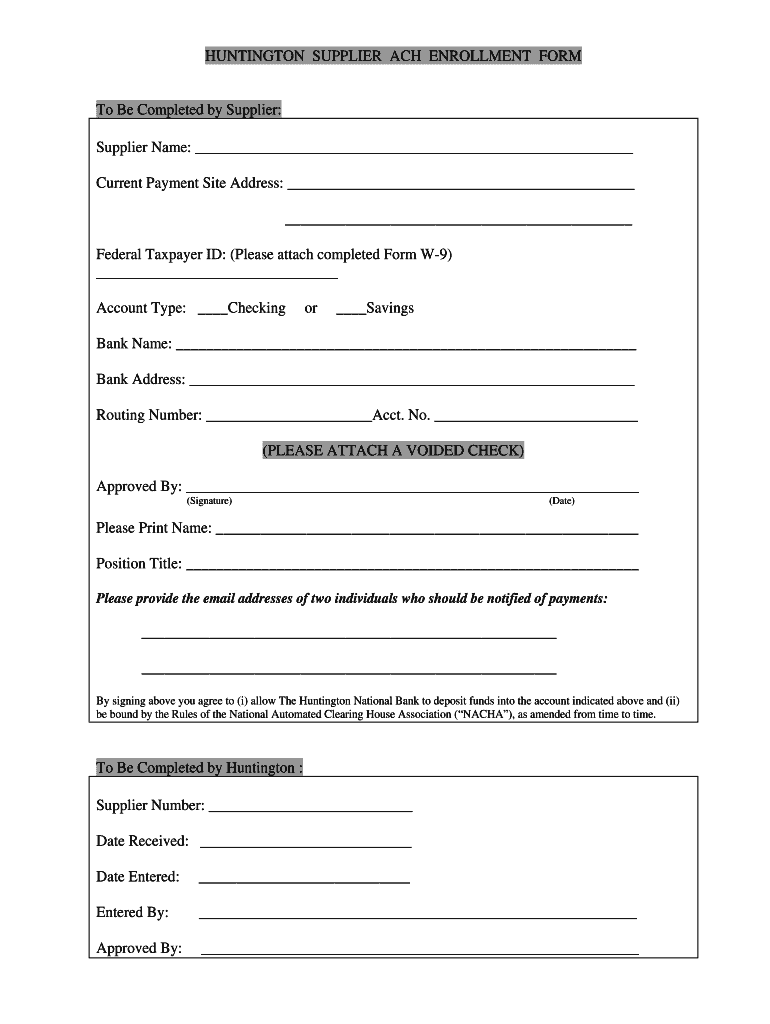
HA”), as amended from time to time. To Be Completed by Huntington : Supplier Number: ___________________________ Date Received: ____________________________ Date Entered: ____________________________ Entered By: __________________________________________________________ Approved By: __________________________________________________________ .
Loading

Open form follow the instructions

Easily sign the form with your finger

Send filled & signed form or save
How to fill out the Huntington Direct Deposit Form online
Filling out the Huntington Direct Deposit Form online ensures a smooth and timely enrollment in the ACH disbursement program. This guide provides clear and detailed instructions for each section of the form to assist you in completing it effectively.
Follow the steps to successfully complete your Huntington Direct Deposit Form.
- Press the ‘Get Form’ button to access the Huntington Direct Deposit Form and open it in your preferred editor.
- Begin by entering your supplier name in the designated field at the top of the form.
- Provide your current payment site address, ensuring it is complete and accurate.
- Fill in your Federal Taxpayer ID, attaching a completed Form W-9 as required.
- Select the type of account you wish to receive deposits into by marking ‘Checking’ or ‘Savings’.
- Enter the bank name where your account is held.
- Provide the bank address to ensure accurate processing of the direct deposit.
- Input your bank's routing number and your account number in the respective fields.
- Attach a voided check to verify your banking information.
- The form must be approved with your signature, date it accordingly, and print your name and position title.
- Lastly, include the email addresses for two individuals to receive notifications regarding payments.
- Review your completed form for accuracy. You can then save changes, download, print, or share the form as needed.
Complete your Huntington Direct Deposit Form online today for efficient payment processing.
Experience a faster way to fill out and sign forms on the web. Access the most extensive library of templates available.
Related content
A voided check, direct deposit form or a letter from your financial institution that...
Please be advised that you must contact the Payroll Dept. at X-2124 before making any...
Aug 26, 2011 — In 2005, the application was a four-part form and “Distribution: Copy 3...
Get answers to your most pressing questions about US Legal Forms API.
How to fill out direct deposit form Huntington?
When filling out the direct deposit form for Huntington, start by writing your account number and the bank's routing number accurately. Include your name, address, and any other required personal information. It is essential to ensure that your employer receives the Huntington Direct Deposit Form to set up the direct deposit correctly. Following these steps will help you enjoy seamless payment transfers.
How to fill out a Huntington direct deposit form?
To complete a Huntington Direct Deposit Form, begin by entering your personal information like your name and account details. Next, provide your employer's information, including their name and address. Make sure to include the correct routing number for Huntington Bank and any other requested details. After verifying your information, submit the form to your employer for processing.
How to fill out direct deposit form?
To fill out a direct deposit form, gather the necessary information such as your bank account number and routing number. Write your name, address, and any other required personal details clearly. For the Huntington Direct Deposit Form, you may also need to include your employer's name and address. Once completed, submit the form to your employer to start receiving payments directly.
How do I fill out a deposit form?
Filling out a deposit form is straightforward. Start by clearly writing your name, account number, and the branch information. For a Huntington Direct Deposit Form, include your employer’s details and any specific instructions they may require. Make sure to double-check your entries to avoid delays in processing your direct deposit.
When filling out a direct deposit form, what does branch mean?
In the context of the Huntington Direct Deposit Form, 'branch' refers to the specific Huntington Bank location where your account is held. Including the correct branch information ensures that your funds are deposited into the right account. If you are unsure about which branch to list, you can find this information on your bank statement or by contacting Huntington Bank directly.
How does direct deposit work at Huntington Bank?
Direct deposit at Huntington Bank allows you to receive your paycheck or other payments directly into your bank account. This process is secure and efficient, eliminating the need for paper checks. To set it up, simply complete the Huntington Direct Deposit Form and provide it to your employer or payer. You’ll enjoy faster access to your funds without the hassle of visiting a bank.
Can a direct deposit be done online?
Yes, direct deposits can be established online using the Huntington Direct Deposit Form. You only need to fill it out and submit it to your employer electronically. This method makes setting up direct deposit quick and straightforward without any need for physical paperwork.
Can I make my own bank deposit slips?
While you might consider creating your own deposit slips, it's recommended to use official Huntington Bank deposit slips instead. You can obtain these slips directly from the bank or print them through your online banking account. Using the correct forms ensures that your deposits are processed smoothly.
How do I get a direct deposit form?
You can access a Huntington Direct Deposit Form via the Huntington Bank website or your online banking platform. Simply download the form, fill it out with accurate information, and submit it to your employer for processing.
How to get a void check from Huntington Bank?
To get a void check from Huntington Bank, you can log in to your online banking account. Navigate to the checks section and select the option to print a voided check. Alternatively, you can write 'VOID' across a physical check, ensuring you keep it for your records.
Use professional pre-built templates to fill in and sign documents online faster. Get access to thousands of forms.
If you believe that this page should be taken down, please follow our DMCA take down process here.