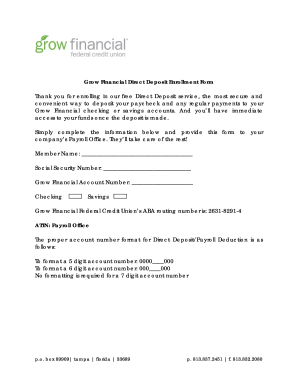
Grow Financial Direct Deposit Enrollment Form Thank you for enrolling in our free Direct Deposit service, the most secure and convenient way to deposit your paycheck and any regular payments to your.

How it works
  • Open form

    Open form follow the instructions

  • Easily sign form

    Easily sign the form with your finger

  • Share form

    Send filled & signed form or save

How to fill out the Grow Financial Direct Deposit Enrollment Form online

Enrolling in the Grow Financial Direct Deposit service is a secure and convenient way to ensure your paycheck and regular payments are deposited directly into your account. This guide provides clear, step-by-step instructions to assist users in completing the enrollment form online effectively.

Follow the steps to complete the Grow Financial Direct Deposit Enrollment Form online.

  1. Press the ‘Get Form’ button to access the document and open it for editing.
  2. Fill in your member name in the designated field. Ensure that you provide the name that matches your identification.
  3. Enter your social security number in the appropriate section. Be cautious to avoid any errors, as this number is necessary for identification purposes.
  4. Provide your Grow Financial account number. Make sure to follow the account number format guidelines: use '0000____000' for 5-digit numbers, '000____000' for 6-digit numbers, and no formatting for 7-digit numbers.
  5. Select whether the deposit should go to your checking or savings account by checking the corresponding box.
  6. Make note of the ABA routing number, which is 2631-8291-4, and ensure it is accurately included, as it directs the funds to your credit union.
  7. Finally, review all the information entered to confirm accuracy before submitting the form to your company’s Payroll Office. This office will process the form for you.

Complete your Grow Financial Direct Deposit Enrollment Form today for seamless online banking!

Get form

Experience a faster way to fill out and sign forms on the web. Access the most extensive library of templates available.

Related content

Legacy: Direct Deposit FAQs - State of Idaho...

How do I sign up for Direct Deposit? Speak to your agency's Human Resources or Payroll...

Learn more
Direct Deposit - It's Your Yale

Instructions on how to sign up for Direct Deposit · Login to Workday(Link is external)...

Learn more
ZILLOW GROUP, INC.

May 4, 2021 — Indicate by check mark whether the registrant (1) has filed all reports...

Learn more
Questions & Answers

Get answers to your most pressing questions about US Legal Forms API.

Contact support

How do I get a direct deposit form from Grow Financial?

To get a direct deposit form from Grow Financial, simply visit their website and navigate to the forms section. There you will find the Grow Financial Direct Deposit Enrollment Form available for download. Following the prompts on the website will help guide you through the process seamlessly.

Yes, Grow Financial offers early direct deposit features that allow you to access your funds sooner than traditional methods. This means you can receive your paycheck up to two days earlier, enhancing your financial flexibility. To take advantage of this feature, make sure you complete the Grow Financial Direct Deposit Enrollment Form.

You can easily get a direct deposit form through your employer or directly from the Grow Financial website. Look for the Grow Financial Direct Deposit Enrollment Form under their account services section. This form is crucial for setting up direct deposit quickly and efficiently.

Enroll your employees in direct deposit by first providing them with the Grow Financial Direct Deposit Enrollment Form. Ensure they complete the form with accurate details and return it to you. Once you collect all completed forms, submit them to your bank or payroll service provider to streamline the direct deposit process.

To obtain a direct deposit authorization form, you can check with your employer or visit the Grow Financial website. They often provide easy access to the Grow Financial Direct Deposit Enrollment Form in their resources section. Completing this form ensures your funds are deposited directly into your account.

When filling out your Grow Financial Direct Deposit Enrollment Form, include essential details like your bank account number, routing number, and your personal information. Be sure to double-check for accuracy to avoid any delays. This information helps ensure that your deposits go directly into your account without issues.

Filling out the ACH enrollment form is straightforward. Begin by entering your personal information, including your name and account number. Next, provide the necessary authorization details to enable automatic deposits. With the Grow Financial Direct Deposit Enrollment Form, you'll find step-by-step instructions to guide you through this process smoothly.

Typically, processing a Grow Financial Direct Deposit Enrollment Form takes just a few business days. Once your form is submitted, our team verifies the information promptly. You will receive confirmation once your enrollment is complete. This quick process ensures you can start enjoying the benefits of direct deposit right away.

Yes, you can print off the direct deposit form. Head over to the Grow Financial website, download the Grow Financial Direct Deposit Enrollment Form, and print it for your convenience. This allows you to fill it out easily before submitting.

To obtain a direct deposit verification form, visit the Grow Financial website where you can find specific documentation. If you require additional assistance, their customer service can guide you through the process of acquiring the necessary documentation.

Get This Form Now!

Use professional pre-built templates to fill in and sign documents online faster. Get access to thousands of forms.

If you believe that this page should be taken down, please follow our DMCA take down process here.

Get Grow Financial Direct Deposit Enrollment Form