Loading
Form preview
  • US Legal Forms
  • Form Library
  • More Forms
  • More Multi-State Forms
  • Texas Emergency Services Retirement System

Get Texas Emergency Services Retirement System

Texas Emergency Services Retirement System Frank Torres, Chairman Kevin Deiters, Executive Director P.O. Box 12577 Austin, TX 787112577 (800) 9193372 www.tesrs.texas.gov Memorandum TO: FROM: DATE:.

How it works

  1. Open form

    Open form follow the instructions

  2. Easily sign form

    Easily sign the form with your finger

  3. Share form

    Send filled & signed form or save

How to fill out the Texas Emergency Services Retirement System online

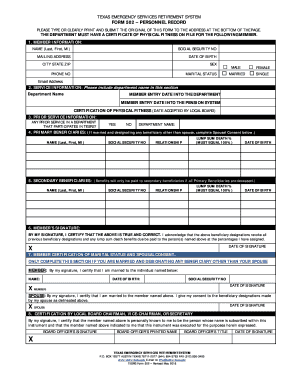
Filling out the Texas Emergency Services Retirement System form can be a straightforward process if you follow the right steps. This guide is designed to provide comprehensive assistance and ensure that your information is correctly submitted online.

Follow the steps to complete the Texas Emergency Services Retirement System form seamlessly.

  1. Click ‘Get Form’ button to download the Texas Emergency Services Retirement System form and open it in your preferred editor.
  2. Begin by accurately entering your member information. Include your full legal name, mailing address, date of birth, sex, marital status, and email address. Ensure that all details are clear and legible.
  3. Complete the service information section. Enter the department name, entry date into the department, entry date into the pension system, and the certification of physical fitness date.
  4. Provide primary beneficiaries' details. List their names, social security numbers, relationship to you, and lump sum death percentage, which must total 100%. If you are married and listing someone other than your spouse, spousal consent is required.
  5. Identify secondary beneficiaries using the same format as primary beneficiaries, noting that benefits will only be paid to them if all primary beneficiaries are deceased.
  6. Sign and date the form to certify that the information provided is accurate. If you are married and did not list your spouse as a primary beneficiary at 100%, ensure spousal consent is provided.
  7. Have the form signed and dated by the Local Board Chairman, Vice-Chairman, or Secretary before submitting it. This certifies that they can verify your identity.
  8. Once completed, save your changes and download the finalized document. You may print it for recorded proof or share it as necessary.

Start completing your Texas Emergency Services Retirement System form online today!

Get form

Experience a faster way to fill out and sign forms on the web. Access the most extensive library of templates available.
Get form

Related content

Texas Emergency Services Retirement System
This computer system is to be only by those individuals with written authorization from...
Learn more
CHAPTER 308 - BENEFITS FROM THE TEXAS EMERGENCY...
CHAPTER 308 - BENEFITS FROM THE TEXAS EMERGENCY SERVICES RETIREMENT SYSTEM (§308.1 to...
Learn more
Your Benefits, Your Choice - CGH Medical Center
Jan 1, 2021 — All benefits EXCEPT retirement options will be available on the CGH...
Learn more

Related links form

California Self-Proving Affidavit Form EForms Free Fillable ... LOUDOUN VALLEY HIGH SCHOOL Parking Permit Application Surat Penutupan Akaun Tnb C: Users Venkatesh Desktop NCSC 2010 Registration Form.doc ... - Krvp

Questions & Answers

Get answers to your most pressing questions about US Legal Forms API.

Contact support

Under these rules, you'll usually need at least 10 qualifying years on your National Insurance record to get any State Pension. You'll need 35 qualifying years to get the full new State Pension. You'll get a proportion of the new State Pension if you have between 10 and 35 qualifying years.

The Rule of 80 It means that once an employee's age and years of service total 80, the employee is eligible to retire.

The State of Texas retirement plan is mandatory for most state agency employees and provides a lifetime annuity when they retire. ... Along with Social Security, State of Texas Retirement and personal retirement savings make up the three-legged stool of retirement income.

Since you can earn 4 credits per year, you need at least 10 years of work that subject to Social Security to become eligible for Social Security retirement benefits.

Age 65 is self-explanatory; rule of 90 is not. It's actuarial jargon. The rule of 90 is a formula for determining when a teacher can draw a normal pension without penalty. This rule is satisfied when your age + years of service = 90.

Generally, a TRS member may retire with the standard benefit at: age 65 with five or more years of service credit; or. with at least five years of service, any combination of age and years of service credit totaling at least 80 (the Rule of 80 ).

Age 65 + 5 years of service. Age 60 + 15 years of service. Rule of 80 (at least age 48) Age + years of service = 80 or more.

If you meet the Rule of 80 and have at least 10 years of service credit, you will be eligible at retirement for a monthly retirement payment, health insurance, and optional benefits. If you do not meet the Rule of 80 but have 10 years of service credit, you will be eligible to retire at age 60.

If you are offered early retirement by your agency under the Voluntary Early Retirement Authority (VERA), you can retire at age 50 with 20 years of service or at any age with 25. However, your annuity will be reduced by 2 percent for every year (1/6 percent per month) that you are under age 55.

Age 65 with five years of service credit, or. At least age 55 but less than age 62, have at least 20 years of service credit, and meet the Rule of 80 (combined age and years of service credit total at least 80), or. At least age 62, meet the Rule of 80, and have at least five years of service credit.

Get This Form Now!

Use professional pre-built templates to fill in and sign documents online faster. Get access to thousands of forms.
Get form
If you believe that this page should be taken down, please follow our DMCA take down processhere.

Industry-leading security and compliance

US Legal Forms protects your data by complying with industry-specific security standards.
  • In businnes since 1997
    25+ years providing professional legal documents.
  • Accredited business
    Guarantees that a business meets BBB accreditation standards in the US and Canada.
  • Secured by Braintree
    Validated Level 1 PCI DSS compliant payment gateway that accepts most major credit and debit card brands from across the globe.
Get Texas Emergency Services Retirement System
Get form
  • Adoption
  • Bankruptcy
  • Contractors
  • Divorce
  • Home Sales
  • Employment
  • Identity Theft
  • Incorporation
  • Landlord Tenant
  • Living Trust
  • Name Change
  • Personal Planning
  • Small Business
  • Wills & Estates
  • Packages A-Z
  • Affidavits
  • Bankruptcy
  • Bill of Sale
  • Corporate - LLC
  • Divorce
  • Employment
  • Identity Theft
  • Internet Technology
  • Landlord Tenant
  • Living Wills
  • Name Change
  • Power of Attorney
  • Real Estate
  • Small Estates
  • Wills
  • All Forms
  • Forms A-Z
  • Form Library
  • Legal Hub
  • About Us
  • Help Portal
  • Legal Resources
  • Blog
  • Affiliates
  • Contact Us
  • Delete My Account
  • Site Map
  • Industries
  • Forms in Spanish
  • Localized Forms
  • State-specific Forms
  • Forms Kit
  • Real Estate Handbook
  • All Guides
  • Notarize
  • Incorporation services
  • For Consumers
  • For Small Business
  • For Attorneys
  • USLegal
  • FormsPass
  • pdfFiller
  • signNow
  • altaFlow
  • DocHub
  • Instapage
Form Packages
  • Adoption
  • Bankruptcy
  • Contractors
  • Divorce
  • Home Sales
  • Employment
  • Identity Theft
  • Incorporation
  • Landlord Tenant
  • Living Trust
  • Name Change
  • Personal Planning
  • Small Business
  • Wills & Estates
  • Packages A-Z
Form Categories
  • Affidavits
  • Bankruptcy
  • Bill of Sale
  • Corporate - LLC
  • Divorce
  • Employment
  • Identity Theft
  • Internet Technology
  • Landlord Tenant
  • Living Wills
  • Name Change
  • Power of Attorney
  • Real Estate
  • Small Estates
  • Wills
  • All Forms
  • Forms A-Z
  • Form Library
Customer Service
  • Legal Hub
  • About Us
  • Help Portal
  • Legal Resources
  • Blog
  • Affiliates
  • Contact Us
  • Delete My Account
  • Site Map
  • Industries
  • Forms in Spanish
  • Localized Forms
  • State-specific Forms
  • Forms Kit
Legal Guides
  • Real Estate Handbook
  • All Guides
Prepared for you
  • Notarize
  • Incorporation services
Our Customers
  • For Consumers
  • For Small Business
  • For Attorneys
Our Sites
  • USLegal
  • FormsPass
  • pdfFiller
  • signNow
  • altaFlow
  • DocHub
  • Instapage
Social Media
Call us now toll free:
+1 833 426 79 33
As seen in:
© Copyright 1999-2026 airSlate Legal Forms, Inc. 3720 Flowood Dr, Flowood, Mississippi 39232
  • Your Privacy Choices
  • Terms of Service
  • Privacy Notice
  • Content Takedown Policy
  • Bug Bounty Program