Loading
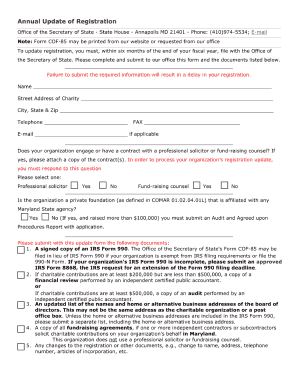
Get Annual Update Of Registration Form
How it works
-

Open form follow the instructions
-

Easily sign the form with your finger
-

Send filled & signed form or save
How to fill out the Annual Update Of Registration Form online
Filling out the Annual Update Of Registration Form online is a straightforward process that allows users to efficiently maintain their registration status. This guide provides detailed, step-by-step instructions to ensure that you complete the form correctly and effectively.
Follow the steps to complete the form accurately.
- Press the 'Get Form' button to access the form and open it in your preferred editing tool.
- Begin by entering your personal information in the designated fields, including your full name, address, and contact details. Ensure that all information is current and accurate.
- Next, provide any required identification numbers, such as a registration ID or social security number, in the appropriate sections.
- Continue by answering any supplementary questions outlined in the form, which may pertain to changes in your status or additional qualifications.
- Review all entries for completeness and accuracy. It is important to confirm that there are no typographical errors.
- Once satisfied with the information entered, you will have the option to save your progress, download a copy, print the form, or share it as needed.
Start filling out your Annual Update Of Registration Form online today to keep your registration up to date.
To request a membership exemption, please submit a copy of the organization's by-laws showing the rights of the members and a statement explaining from whom solicitations for contributions are made. An organization claiming an exemption must provide evidence of its exemption.