Loading
Get Budget Request
How it works
-

Open form follow the instructions
-

Easily sign the form with your finger
-

Send filled & signed form or save
How to fill out the Budget Request online
Completing the Budget Request is an essential step in securing funding for your ministry activities. This guide provides clear and user-friendly instructions for filling out the form accurately and efficiently.
Follow the steps to successfully submit your Budget Request.
- Click ‘Get Form’ button to obtain the form and open it in the editor.
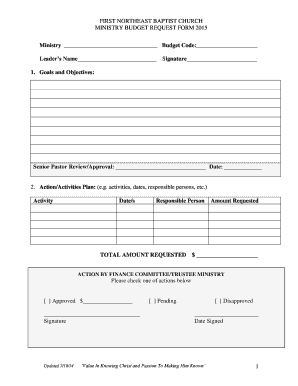
- Begin by entering your ministry’s name and budget code at the top of the form. This information is essential for tracking your request.
- Provide the leader’s name and include their signature. This confirms that the request is approved by the leadership.
- In the goals and objectives section, outline what you aim to achieve with this budget request. A Senior Pastor review and approval is needed, so leave space for their signature and the date.
- Detail your action and activities plan. In this section, list all activities, respective dates, and the persons responsible for each task. Make sure to be specific to ensure clarity.
- Include the total amount requested. This number should reflect all expenses necessary to carry out your proposed activities.
- In the finance committee/trustee ministry section, select one of the checkboxes to indicate the action taken (approved, pending, or disapproved). Ensure that the appropriate amount is entered if it is approved.
- For the activity name, description, and proposed dates, complete this sheet for each major activity listed on the first page. Attach additional sheets if necessary.
- Fill in the activity justification, which explains why your activity is important and how it aligns with the ministry goals.
- Complete the proposed budget section by estimating the income and expenses related to the activity. The total net income/expense should reflect the difference between these amounts.
- Finally, review all entries for accuracy, save any changes made, and be sure to download or print the finalized document for your records before submitting it.
Start the process now by completing your Budget Request online.
The federal budget for the 2020 fiscal year was set at $4.79 trillion.
Industry-leading security and compliance
US Legal Forms protects your data by complying with industry-specific security standards.
-
In businnes since 199725+ years providing professional legal documents.
-
Accredited businessGuarantees that a business meets BBB accreditation standards in the US and Canada.
-
Secured by BraintreeValidated Level 1 PCI DSS compliant payment gateway that accepts most major credit and debit card brands from across the globe.