Loading
Form preview
  • US Legal Forms
  • Other Templates
  • More Forms
  • More Multi-State Forms
  • Fort Campbell Form 2635

Get Fort Campbell Form 2635

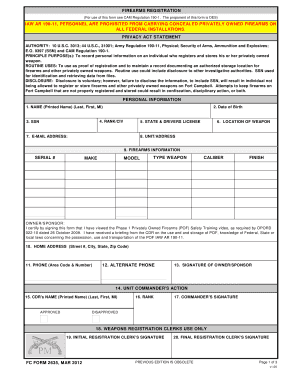
FIREARMS REGISTRATION (For use of this form see CAM Regulation 1901. The proponent of this form is DES)IAW AR 19011, PERSONNEL ARE PROHIBITED FROM CARRYING CONCEALED PRIVATELY OWNED FIREARMS ON ALL.

How it works

  1. Open form

    Open form follow the instructions

  2. Easily sign form

    Easily sign the form with your finger

  3. Share form

    Send filled & signed form or save

How to fill out the Fort Campbell Form 2635 online

The Fort Campbell Form 2635 is essential for registering privately owned firearms on the installation. This guide provides a step-by-step approach to help you fill out the form online with clarity and confidence.

Follow the steps to successfully complete the Fort Campbell Form 2635 online.

  1. Press the ‘Get Form’ button to access the Fort Campbell Form 2635 and open it in your preferred online editor.
  2. Begin by entering your personal information in the designated fields. Input your name (last, first, middle initial), date of birth, and social security number (SSN), ensuring accuracy for identification purposes.
  3. Next, fill in your rank or civilian status and the state from which you hold a driver's license. Include the location where the firearm will be stored, either on-post or off-post.
  4. Provide your email address and the unit/address where you are affiliated. This information may be used for future correspondence regarding your registration.
  5. In the firearms information section, input details for each firearm you are registering. Include the serial number, make, model, type of weapon, caliber, and finish.
  6. Certify your understanding by digitally signing the form, indicating that you have completed the required safety training related to privately owned firearms.
  7. Enter your home address, including the street number, city, state, and zip code, followed by your primary phone number and an alternate phone number.
  8. If applicable, secure your unit commander's approval by providing their name, rank, and signature in the commander’s action section.
  9. Finalize your form by saving changes, and you will have the option to download, print, or share the completed document for submission.

Complete your firearms registration process online today for a seamless experience.

Get form

Experience a faster way to fill out and sign forms on the web. Access the most extensive library of templates available.
Get form

Related content

[Congressional Bills 111th Congress] [From the...
Land conveyance, Fort Knox, Kentucky. ... Fort Campbell. ... 2635) is amended by adding at...
Learn more
Clinical Test Request Forms- State Hygienic Lab...
Electronic Coronavirus (COVID-19) PCR and Serology Test Request Form ... 17526 - COMMUNITY...
Learn more
Product Data Sheet: Hydrophones — Types 8103...
1000 m (3250 ft.) ocean depth). A built-in ... Conditioning Amplifier Type 2635 or...
Learn more

Related links form

Vauxhall Zafira A Repair Manual Download Fedloan Servicing Fax Number Form 1c Depedmisocc Ph

Questions & Answers

Get answers to your most pressing questions about US Legal Forms API.

Contact support

Fort Campbell, KY - In Processing Check in can be done 24 hours a day, 7 days a week. All Soldiers must report between 0600-1730 in Army Combat Uniform. In-processing will take about 6-8 days, and soldier will need to be in uniform with an appropriate haircut that will be inspected.

Fort Campbell, KY - Gate Hours, Map and Status Freeman, Gate 7, Gate 10, Sabre I and Sabre II Gates are all open 24 hours. Both T.C Freeman and Gate 7 are Visitor Control Center (VCC) locations. Gate 1 hours are 0430-2100 M-F & holidays, and 0630-2100 on weekends. Gate 2 is only open to morning traffic, M-F: 0430-1000.

Fort Campbell is a restricted-access base. All persons 18 years and older entering the installation are required to show picture identification. Fort Campbell regulations prohibit the use of cellphones while operating a motor vehicle, except with the use of a hands-free device.

"Rendezvous With Destiny" The 101st Airborne Division (Air Assault) is the only air assault division of the United States Army.

Fort Campbell is home to the 101st Airborne Division (Air Assault), 5th Special Forces Group, 160th Special Operations Aviation Regiment, 531st Hospital Center, 52nd Ordnance Group (EOD), and sizeable medical and dental activities.

Get This Form Now!

Use professional pre-built templates to fill in and sign documents online faster. Get access to thousands of forms.
Get form
If you believe that this page should be taken down, please follow our DMCA take down processhere.
Get Fort Campbell Form 2635
Get form
  • Adoption
  • Bankruptcy
  • Contractors
  • Divorce
  • Home Sales
  • Employment
  • Identity Theft
  • Incorporation
  • Landlord Tenant
  • Living Trust
  • Name Change
  • Personal Planning
  • Small Business
  • Wills & Estates
  • Packages A-Z
  • Affidavits
  • Bankruptcy
  • Bill of Sale
  • Corporate - LLC
  • Divorce
  • Employment
  • Identity Theft
  • Internet Technology
  • Landlord Tenant
  • Living Wills
  • Name Change
  • Power of Attorney
  • Real Estate
  • Small Estates
  • Wills
  • All Forms
  • Forms A-Z
  • Other Templates
  • Legal Hub
  • About Us
  • Help Portal
  • Legal Resources
  • Blog
  • Affiliates
  • Contact Us
  • Delete My Account
  • Site Map
  • Industries
  • Forms in Spanish
  • Localized Forms
  • State-specific Forms
  • Forms Kit
  • Real Estate Handbook
  • All Guides
  • Notarize
  • Incorporation services
  • For Consumers
  • For Small Business
  • For Attorneys
  • USLegal
  • FormsPass
  • pdfFiller
  • signNow
  • altaFlow
  • DocHub
  • Instapage
Form Packages
  • Adoption
  • Bankruptcy
  • Contractors
  • Divorce
  • Home Sales
  • Employment
  • Identity Theft
  • Incorporation
  • Landlord Tenant
  • Living Trust
  • Name Change
  • Personal Planning
  • Small Business
  • Wills & Estates
  • Packages A-Z
Form Categories
  • Affidavits
  • Bankruptcy
  • Bill of Sale
  • Corporate - LLC
  • Divorce
  • Employment
  • Identity Theft
  • Internet Technology
  • Landlord Tenant
  • Living Wills
  • Name Change
  • Power of Attorney
  • Real Estate
  • Small Estates
  • Wills
  • All Forms
  • Forms A-Z
  • Other Templates
Customer Service
  • Legal Hub
  • About Us
  • Help Portal
  • Legal Resources
  • Blog
  • Affiliates
  • Contact Us
  • Delete My Account
  • Site Map
  • Industries
  • Forms in Spanish
  • Localized Forms
  • State-specific Forms
  • Forms Kit
Legal Guides
  • Real Estate Handbook
  • All Guides
Prepared for you
  • Notarize
  • Incorporation services
Our Customers
  • For Consumers
  • For Small Business
  • For Attorneys
Our Sites
  • USLegal
  • FormsPass
  • pdfFiller
  • signNow
  • altaFlow
  • DocHub
  • Instapage
Social Media
Call us now toll free:
+1 833 426 79 33
As seen in:
© Copyright 1999-2026 airSlate Legal Forms, Inc. 17 Station Street, Suite 303, Brookline, MA 02445
  • Your Privacy Choices
  • Terms of Service
  • Privacy Notice
  • Content Takedown Policy
  • Bug Bounty Program