Loading
Get Mohela Deferment
How it works
-

Open form follow the instructions
-

Easily sign the form with your finger
-

Send filled & signed form or save
How to fill out the Mohela Deferment online
Filling out the Mohela Deferment form online can help you manage your student loan payments during times of financial hardship. This guide provides a clear, step-by-step approach to ensure you complete the form accurately and efficiently.
Follow the steps to successfully complete the Mohela Deferment form online.
- Click ‘Get Form’ button to obtain the Mohela Deferment form and open it for editing.
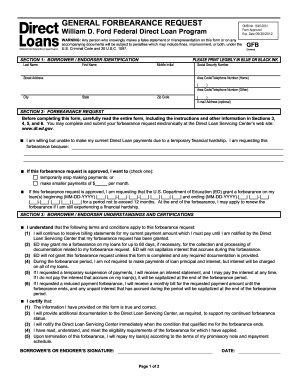
- Begin by entering your identifying information in Section 1. This includes your last name, first name, middle initial, street address, Social Security Number, and contact numbers. Ensure all information is accurate and legible.
- In Section 2, indicate your reason for requesting forbearance. Select either to temporarily stop payments or make smaller monthly payments by filling in the desired amount.
- Specify the duration for your forbearance request by providing the start and end dates in the designated MM-DD-YYYY format. Remember that the forbearance cannot exceed 12 months.
- Review Section 3 carefully, as it outlines your understandings and certifications. Ensure you understand the terms of forbearance and that you meet the eligibility requirements. Initial as required.
- Sign and date the form where indicated. Your signature certifies the accuracy of the information provided.
- Finally, save your changes. You have the option to download, print, or share the completed form as necessary.
Complete your Mohela Deferment form online today to ensure timely processing and support for your financial needs.
MOFELP In-School Deferment Request Form Contact the MOFELP Department at 800.809. 0964 or mofelp@mohela.com with any questions regarding deferment and forbearance options.