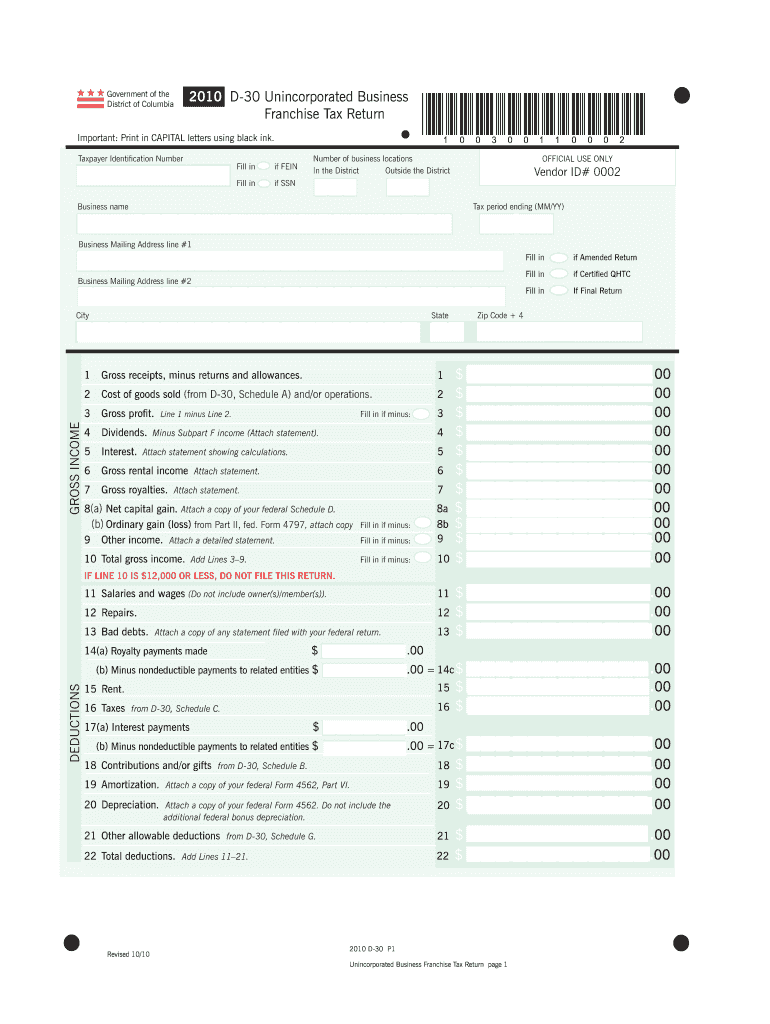
Er Fill in if FEIN Fill in *100300110002* Number of business locations In the District Outside the District OFFICIAL USE ONLY if SSN Business name l Vendor ID# 0002 Tax period ending (MM/YY) Business Mailing Address line #1 Fill in City State if Certified QHTC Fill in Business Mailing Address line #2 if Amended Return Fill in If Final Return Zip Code + 4 1 $ 2 $ 3 $ 4 $ 5 $ 6 $ 7 $ 8a $ 8b $ 9 $ 10 $ .00 .00 .00 .00 .00 .00 .00 .00 .00.
Loading

Open form follow the instructions

Easily sign the form with your finger

Send filled & signed form or save
How to fill out the Form D 30 online
Filling out the Form D 30 online can seem daunting, but this guide will help you navigate through each section with ease. This document is essential for unincorporated businesses in the District of Columbia to report their franchise tax return accurately.
Follow the steps to successfully complete the Form D 30 online.
- Press the ‘Get Form’ button to access the form and open it in your preferred editor.
- Begin by entering your Taxpayer Identification Number (TIN). If your business uses a Federal Employer Identification Number (FEIN), fill that in. If you have a Social Security Number (SSN), be sure to complete that field instead.
- Input the number of business locations both inside and outside the District of Columbia.
- Enter your business name and vendor identification number.
- Indicate the tax period ending date in MM/YY format.
- Fill out the business mailing address, ensuring accuracy for Line #1 and #2, including the city, state, and ZIP code.
- Proceed to report gross receipts, gross income, and deductions as indicated on the form, ensuring to attach any necessary statements required for lines involving special categories like capital gains or losses.
- Complete the schedules for apportionment and any other required calculations, referring to your federal forms for additional data.
- As you near completion, review all entries for accuracy and completeness before finalizing.
- Once fully completed, save your changes, and choose to download, print, or share the form as needed.
Complete your Form D 30 online today for a seamless filing experience.
Experience a faster way to fill out and sign forms on the web. Access the most extensive library of templates available.
Related content
Corporate/Unincorporated Tax Forms 2021 Tax Filing Season (Tax Year ... Tax Return (D-20)...
Withholding Tax Forms for 2017 Filing Season (Tax Year 2016) (Please note the Office of...
worksheets D, Parts III and IV. Lines 24 - 29--Reserved for future use. Lines 30...
Get answers to your most pressing questions about US Legal Forms API.
Has DC extended tax deadline?
The District of Columbia has extended the deadline to file and pay all income tax returns until May 17, 2021. This extension applies to all D-20, D-30, D-40, Standalone Schedule H, D-41, D-40B, and D-65 tax filers, and includes combined return filers.
What is DC Form D-30?
The filing of the D-30 is a requirement for operating or continuing to operate a motor vehicle for hire in the District by a non-resident. The minimum tax is $250 if DC gross receipts are $1M or less.
What is Unincorporated Business Franchise Tax DC?
The current franchise tax rate for unincorporated businesses, whether foreign or domestic, is 8.25% of the taxable income of the entity. For entities subject to the tax, the minimum tax payable is $250.
What is DC apportionment factor?
District of Columbia Sales Factor Apportionment Market-Based Sourcing for Sales of Services and Intangibles For taxable years beginning after December 31, 2014, sales other than sales of tangible personal property, are sourced to D.C. if the taxpayer's market for the sales is in D.C. (Market-Based rule).
Where do I send my DC estimated tax payment?
Individual Income Estimated Tax and Extension of Time to File: Mail payment with payment voucher to the Office of Tax and Revenue, PO Box 96018, Washington, DC 20090-6018.
Where do I mail my D-30?
Return with a payment Mail the return and payment to: Office of Tax and Revenue, PO Box 7572, Washington DC 20044-7572. Make the check or money order payable to the DC Treasurer. Write your FEIN or SSN, D-30 and the tax year on the payment.
What is DC franchise tax?
For 2018, the corporate franchise tax is assessed at a flat rate of 8.25%. (Rates have varied over the years.) The tax is based on net income derived from business in DC. There is a minimum tax of $250 if DC gross receipts are $1 million or less.
Where do I mail my DC amended tax return?
Amended returns may be mailed to the Office of Tax and Revenue, P.O. Box 7861, Washington, D.C. 20044-7861.
How do I pay my DC property tax?
Convenient and easy-to-use: No more need to write checks or pay postage. ... Free: We do not charge you to use the online payment system.
Where do I file my FR 900Q?
File Electronically Today! For the latest information related to FR-900Q and its instructions, after publishing, go to www.mytax.dc.gov.
Use professional pre-built templates to fill in and sign documents online faster. Get access to thousands of forms.
If you believe that this page should be taken down, please follow our DMCA take down process here.