Loading
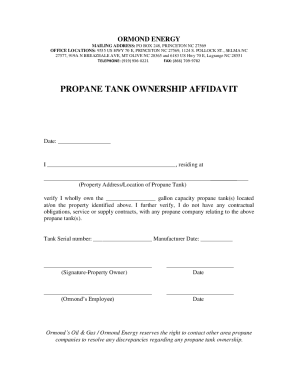
Get Propane Tank Ownership Affidavit - Ormond's Energy
How it works
-

Open form follow the instructions
-

Easily sign the form with your finger
-

Send filled & signed form or save
How to use or fill out the PROPANE TANK OWNERSHIP AFFIDAVIT - Ormond's Energy online
Completing the propane tank ownership affidavit for Ormond's Energy is a straightforward process that can be done online. This guide provides clear steps to help you accurately fill out the affidavit, ensuring you meet all requirements.
Follow the steps to complete the form seamlessly.
- Click the ‘Get Form’ button to access the propane tank ownership affidavit and open it in the editor.
- Enter the date at the top of the form where indicated. Ensure it reflects the current date of completion.
- In the first blank field, provide your full legal name as the property owner.
- Fill in your complete residential address in the designated space, making sure it is accurate to avoid any issues.
- Specify the capacity of the propane tank(s) you own in gallons in the next blank field.
- Record the tank serial number in the designated area. This can typically be found on the tank itself.
- Indicate the manufacturer date of the tank, which can also be found on the tank or on documentation you may have.
- Sign the form in the signature section, confirming that you are the property owner and verifying the information provided.
- Enter the date of your signature in the appropriate area below your name.
- Leave the sections for the Ormond’s employee to sign and date blank for them to complete.
- Once all fields are completed, review the information for accuracy. You can then save your changes, download, print, or share the completed form as needed.
Complete your propane tank ownership affidavit online today for a smooth and efficient process.
Most leased tanks will be branded with a sticker or logo on the actual tank or the lid of the tank. If you see something, call that company and simply ask them if they own the tank.