Loading
Get Eac Online Enrollment
How it works
-

Open form follow the instructions
-

Easily sign the form with your finger
-

Send filled & signed form or save
How to fill out the Eac Online Enrollment online
This guide provides a comprehensive, step-by-step approach to assist you in successfully filling out the Eac Online Enrollment form. Whether you are a new student, transferee, or a foreign applicant, following these instructions will help ensure your application is submitted correctly.
Follow the steps to complete your Eac Online Enrollment form effectively.
- Press the ‘Get Form’ button to access the Eac Online Enrollment form and open it in your preferred editor.
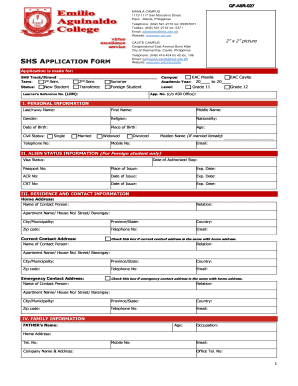
- Begin by selecting the SHS track or strand you are applying for in the designated field. Then, indicate the term you wish to enroll in, choosing between 1st Semester, 2nd Semester, or Summer.
- Select your preferred campus from the options provided: EAC Manila or EAC Cavite, and fill in the academic year for which you are applying.
- Identify your status by checking the appropriate box indicating whether you are a new student, transferee, or foreign student. Provide your learner's reference number as applicable and indicate your grade level.
- Fill in your personal information. This includes your last name, first name, middle name, gender, religion, nationality, date of birth, place of birth, age, and civil status. Complete the additional field for maiden name if applicable.
- If you are a foreign student, complete the Alien Status Information section by providing your visa status, date of authorized stay, passport number, place of issue, expiration date, and any applicable national identification numbers.
- Provide your residence and contact information. This includes your home address and contact details, as well as current contact information if different from your home address. If you wish, you can check the provided boxes to indicate if these addresses are the same.
- Fill out the family information section, including details about your parents or guardian, such as their names, ages, occupations, contact information, and educational backgrounds.
- Complete the educational background section by listing the schools you have attended, including elementary, junior high school, and senior high school, along with the year you graduated or last attended.
- In the personal health history section, provide details about your last medical check-up, indicate any present or past health conditions by marking the applicable boxes, and include any behavioral conditions that could affect your studies.
- Finally, read and certify that the information provided is true and correct. Sign the document and include the date to finalize your application.
- Once you have completed all necessary sections, review your form for accuracy. You may then save your changes, download, print, or share the completed form as needed.
Begin your Eac Online Enrollment now by filling out your form electronically.
You're assured admission to the University of Arizona if you: Attend a regionally accredited high school. Rank in the top 25 percent of your graduating class and meet core coursework requirements. Earn an unweighted GPA of 3.0 or higher in your core competency requirements based on your 6th semester grades*.