Loading
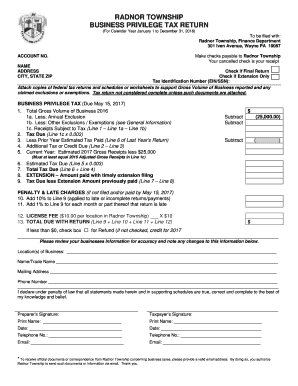
Get Radnor Business Privilege Tax
How it works
-

Open form follow the instructions
-

Easily sign the form with your finger
-

Send filled & signed form or save
How to fill out the Radnor Business Privilege Tax online
Filing the Radnor Business Privilege Tax can seem daunting, but this guide simplifies the process for you. Follow these steps to ensure accurate completion of the form online, whether you are a seasoned taxpayer or filling out this form for the first time.
Follow the steps to successfully complete your tax return.
- Press the ‘Get Form’ button to acquire the required form and access it in your preferred document editor.
- Fill in your name, address, city, state, and ZIP code in the designated fields. Ensure that all information is accurate to avoid complications.
- Indicate if this is your final return or if you are only applying for an extension by checking the appropriate boxes.
- Provide your Tax Identification Number, which may be your Employer Identification Number (EIN) or Social Security Number (SSN).
- Attach copies of your federal tax returns and any relevant schedules or worksheets as evidence supporting the Gross Volume of Business reported and any claimed exclusions or exemptions.
- Calculate your total Gross Volume of Business for 2016 and enter this amount on Line 1.
- On Line 1a, list any annual exclusions you can claim as defined by the tax regulations. Subtract this amount from your total Gross Volume.
- Identify other exclusions or exemptions you can claim on Line 1b, and subtract this from the remaining total.
- On Line 1c, record your Receipts Subject to Tax, calculated by subtracting Lines 1a and 1b from Line 1.
- To find the Tax Due, multiply the amount on Line 1c by the tax rate of 0.003 and write this amount on Line 2.
- If you made estimated tax payments last year, enter the amount from Line 6 of last year’s return on Line 3.
- Calculate any Additional Tax or Credit Due on Line 4 by subtracting the amount on Line 3 from the amount on Line 2.
- Estimate your Gross Receipts for the current year, subtract the $25,000 exemption, and record this on Line 5.
- Calculate the Estimated Tax Due on Line 6 by multiplying the amount on Line 5 by 0.003.
- On Line 7, compute the Total Tax Due by adding Lines 6 and 4.
- If you applied for an extension, indicate the amount paid with your extension on Line 8.
- Subtract Line 8 from Line 7 to determine your final balance due on Line 9.
- If applicable, add penalties and late charges as indicated in the instructions for Lines 10, 11, and 12.
- Calculate the Total Due with Return on Line 13, ensuring that you also check the appropriate box if a refund is applicable.
- Verify all your entries for accuracy, then sign and date the form. Provide contact details as needed, including an email for further communication.
- Finalize your submission by choosing to save changes, download, print, or share the completed form.
Complete your Radnor Business Privilege Tax return online today for a seamless filing experience.
Get form
Experience a faster way to fill out and sign forms on the web. Access the most extensive library of templates available.
Make checks payable to: HAB-BPT (short for: H A Berkheimer-Business Privilege Tax)
Get This Form Now!
Use professional pre-built templates to fill in and sign documents online faster. Get access to thousands of forms.