Loading
Get Dmas 98r
How it works
-

Open form follow the instructions
-

Easily sign the form with your finger
-

Send filled & signed form or save
How to fill out the Dmas 98r online
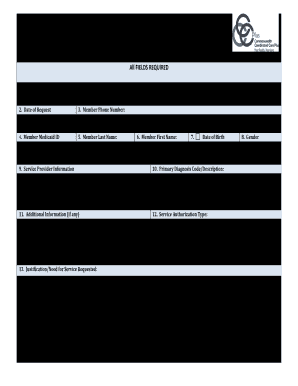
Filling out the Dmas 98r form online can streamline the submission process for home and community-based services requests. This guide provides clear, step-by-step instructions to help users complete the form accurately and efficiently.
Follow the steps to effectively complete the Dmas 98r form online.
- Click ‘Get Form’ button to access the Dmas 98r and open it in the online editor.
- Select the request type by placing a checkmark in the appropriate box for either New Request or Change Request.
- Enter the Date of Request in the format MM/DD/YYYY.
- Provide the Member Phone Number, ensuring to include the area code; if unavailable, input N/A.
- Input the Member Last Name exactly as it appears on the Medicaid card.
- Input the Member First Name exactly as it appears on the Medicaid card.
- Enter the Date of Birth in the format MM/DD/YYYY.
- Indicate the Gender by placing a checkmark for Male or Female.
- Complete the Service Provider Information section, including the Provider Name, NPI/API Provider ID Number, Provider Street Address and City, and the 9-digit zip code.
- Provide the Primary Diagnosis Code/Description that indicates the reason for the services requested.
- If necessary, fill out the Additional Information section for any extra details regarding the request.
- Select the Service Authorization Type by checking the appropriate box.
- Detail the Justification/Need for the service requested based on the guidelines.
- Add any Additional Comments to support the request.
- Provide the Procedure Code (National Code) relevant to the service being requested.
- Write a Narrative Description explaining the Procedure Code.
- Input any Modifiers, if applicable.
- State the Units/Hours Requested based on the physician's orders.
- Include the Frequency of service visits as specified in the Plan of Care.
- If applicable, detail the Actual Cost per Unit for services like Assistive Technology or Environmental Modifications.
- Indicate the Total Dollars Requested, if necessary.
- Fill in the planned Dates of Service, ensuring both the From and Thru dates are completed.
- Provide the Provider Contact Person’s name for any inquiries.
- Input the Provider Contact Phone Number.
- Finally, provide the Provider Contact Fax Number for any communications regarding the request.
- Save changes, download, print, or share the completed form as needed.
Complete your Dmas 98r form online today for a streamlined service request process.
Home - Department of Medical Assistance Services. Cardinal Care. Virginia's Medicaid Program. MES Portal.
Industry-leading security and compliance
US Legal Forms protects your data by complying with industry-specific security standards.
-
In businnes since 199725+ years providing professional legal documents.
-
Accredited businessGuarantees that a business meets BBB accreditation standards in the US and Canada.
-
Secured by BraintreeValidated Level 1 PCI DSS compliant payment gateway that accepts most major credit and debit card brands from across the globe.