Loading
Get Appraisal And Reconditioning Form - Clickmotive
How it works
-

Open form follow the instructions
-

Easily sign the form with your finger
-

Send filled & signed form or save
How to fill out the Appraisal And Reconditioning Form - ClickMotive online
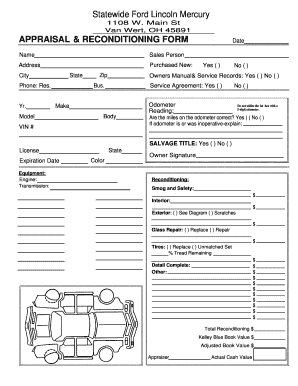
Completing the Appraisal And Reconditioning Form online is essential for accurate vehicle assessment. This guide will provide you with step-by-step instructions to ensure a smooth filling process.
Follow the steps to effectively complete the form.
- Click the ‘Get Form’ button to access the appraisal and reconditioning form online.
- Begin by entering your name and the salesperson's name in the designated fields. Provide your address, including city, state, and zip code.
- Indicate whether the vehicle is purchased new by selecting 'Yes' or 'No.'
- Fill in the odometer reading, ensuring not to use a 5-digit entry for this field. Confirm if the miles on the odometer are correct by selecting 'Yes' or 'No.' If the odometer was inoperative, provide an explanation in the space provided.
- State whether the vehicle has a salvage title by selecting 'Yes' or 'No,' and indicate the state of the title.
- List the vehicle's details, including make, model, year, and VIN. Provide contact numbers such as business and residential phones.
- Specify if you have the owner's manual and service records available. Choose 'Yes' or 'No' accordingly.
- Complete the reconditioning section by providing details about various repairs needed, including interior, exterior, glass repair options, and tires. Include costs for each category and any other necessary remarks.
- Calculate and fill in the total reconditioning costs, as well as the Kelley Blue Book value and adjusted book value for the vehicle.
- Finally, add your signature at the designated area and complete the process by saving changes, downloading, printing, or sharing the form as needed.
Complete your paperwork with ease by filling out the Appraisal And Reconditioning Form online today.