Loading
Get Sedgwick County Tag Office
How it works
-

Open form follow the instructions
-

Easily sign the form with your finger
-

Send filled & signed form or save
How to fill out the Sedgwick County Tag Office online
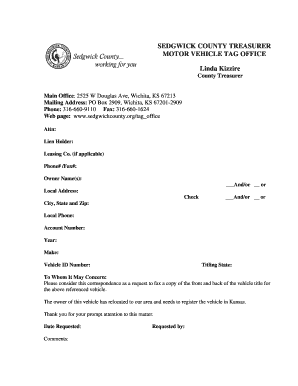
This guide provides comprehensive instructions on how to fill out the Sedgwick County Tag Office form online. By following these steps, users can efficiently complete the necessary documentation for vehicle registration in Sedgwick County.
Follow the steps to fill out the form successfully.
- Click ‘Get Form’ button to access the form and open it in the document editor.
- Provide the lien holder's name in the designated field, if applicable. If there is a leasing company involved, include their name as well.
- Enter the applicable phone number and fax number for the lien holder or leasing company.
- Input the owner's name(s) in the relevant section, ensuring that you use 'and/or' to clarify if there are multiple owners.
- Fill in the local address where the vehicle is registered.
- Provide the city, state, and zip code corresponding to the local address.
- Enter the local phone number for the owner.
- Input the account number associated with the vehicle registration, if available.
- Specify the year of the vehicle.
- Indicate the make of the vehicle.
- Fill in the vehicle identification number (VIN).
- State the titling state where the vehicle is registered.
- In the comments section, include any additional information or requests as needed.
- Fill in the date the request is made.
- Provide the name of the person requesting the information at the bottom of the form.
- Once all fields are completed, save your changes. You can then download, print, or share the filled-out form.
Complete your forms online with confidence today!
If you have to come into a tag office, bring last year's registration receipt, tag number, current insurance card, and a picture identification card or driver's license.