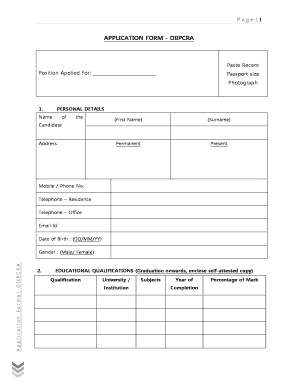
Get Page 1 Application Form - Oiipcra
How it works
-

Open form follow the instructions
-

Easily sign the form with your finger
-

Send filled & signed form or save
How to fill out the Page 1 APPLICATION FORM - OIIPCRA online
Completing the Page 1 APPLICATION FORM - OIIPCRA online involves several important steps to ensure that all necessary information is provided accurately. This guide offers clear instructions for each section of the form to facilitate a smooth application process.
Follow the steps to successfully complete the online application form.
- Click ‘Get Form’ button to obtain the form and open it in the editor.
- Begin by filling in the personal details section. Include your first name, surname, complete address, mobile or phone number, residence telephone number, office telephone number, and email address. Also, input your date of birth in the format of DD/MM/YY and select your gender.
- Move to the educational qualifications section. List your qualifications starting from graduation onwards. For each qualification, include the name of the university or institution, the subjects studied, year of completion, and the percentage of marks obtained. Ensure that you have a self-attested copy ready for submission.
- In the other qualifications/training section, provide the course name, duration, institution, and details relevant to any short training courses you have completed.
- Outline your employment or work experience, starting with your most recent position. Document the name and designation of your employer, duration of employment, and a brief description of your responsibilities. A self-attested copy of relevant experience should accompany this section.
- Fill in the computer literacy section, indicating your levels of knowledge for various software applications as basic, working, or expert by ticking the relevant column.
- Provide details of your language proficiency. For each language such as English, Hindi, and Odia, indicate your ability to converse, read, and write using the provided scale of poor, fair, or good.
- In the additional information section, you may provide any information that may strengthen your candidacy, keeping within 500 words.
- List two references in the designated section. These should be individuals to whom you have professionally reported.
- Complete the declaration by affirming that all statements made in the application are accurate. Include the date and place, and sign the form to finalize your application.
- Once you have filled in all sections, ensure to save your changes. You can then download, print, or share the completed form as required.
Complete your application online to ensure a comprehensive submission.
KALIA or “Krushak Assistance for Livelihood and Income Augmentation” scheme was launched by the Odisha Government for farmer's welfare. The aim of the scheme is to accelerate agricultural prosperity and reduce poverty in the State payments to encourage cultivation and associated activities. Odisha Government's KALIA Scheme - Drishti IAS drishtiias.com https://.drishtiias.com › pdf › odisha-governments-k... drishtiias.com https://.drishtiias.com › pdf › odisha-governments-k...