Loading
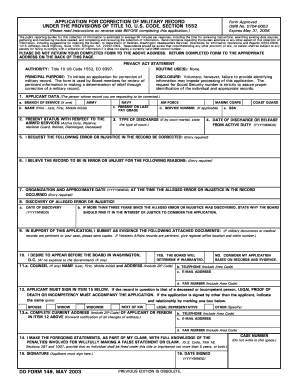
Get Dd Form 149
How it works
-

Open form follow the instructions
-

Easily sign the form with your finger
-

Send filled & signed form or save
How to fill out the DD Form 149 online
Filling out the DD Form 149, an application for correction of military record, can seem daunting. This guide aims to provide clear, step-by-step instructions to help you complete the form accurately and efficiently.
Follow the steps to successfully complete the DD Form 149 online.
- Click ‘Get Form’ button to obtain the form and open it in your preferred online editor.
- Begin with Section 1, which identifies you as the applicant. Select your branch of service by marking the appropriate box, and then provide your full name as it appears in official records.
- In Section 2, indicate your current status with the Armed Services. This could include active duty, reserves, or retired status.
- Section 3 requires you to detail your type of discharge. If applicable, please also state the type of court-martial if that applies to your situation.
- In Section 5, state the specific error or injustice in your record that you wish to have corrected.
- Use Section 6 to explain why you believe the record is erroneous or unjust. Provide as much detail as possible to support your case.
- Section 7 requires the organization and approximate date of the incident related to the alleged error or injustice.
- In Section 8, inform the date you discovered the alleged error. If this is more than three years after discovery, explain why the Board should still consider your case.
- Section 9 is where you will submit any additional documentation as evidence supporting your application. Ensure to include copies of relevant military or medical records.
- For Section 10, indicate whether you wish to appear before the Board. Choose 'yes' or 'no' accordingly.
- Complete Section 11 if you have counsel representing you. Include their contact details.
- Make sure to fill out Section 12 regarding the applicant's signature. If signed by another person, provide their relationship to the applicant.
- In Section 13, provide your complete current address and contact information.
- Section 14 includes a statement concerning the truthfulness of your claims. Ensure that you understand the implications of falsifying statements.
- Finally, make sure to sign and date the form in Section 15.
- After completing the form, review all entries for accuracy. Save changes, then download, print, or share the form as needed.
Complete your application for correction of military records online today.
Can I Get a Discharge Upgrade? You can apply to the Discharge Review Board (DRB) of your branch of the service for a discharge upgrade or a change in the discharge reason (that is, character of service).
Industry-leading security and compliance
US Legal Forms protects your data by complying with industry-specific security standards.
-
In businnes since 199725+ years providing professional legal documents.
-
Accredited businessGuarantees that a business meets BBB accreditation standards in the US and Canada.
-
Secured by BraintreeValidated Level 1 PCI DSS compliant payment gateway that accepts most major credit and debit card brands from across the globe.