Get Ca Pasadena City College Consortium Agreement 2010-2026
How it works
-

Open form follow the instructions
-

Easily sign the form with your finger
-

Send filled & signed form or save
How to fill out the CA Pasadena City College Consortium Agreement online
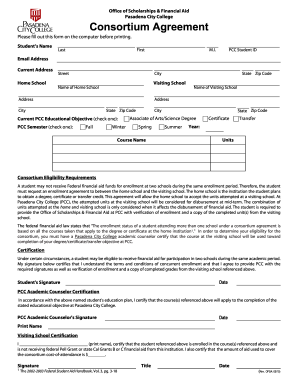
Filling out the CA Pasadena City College Consortium Agreement online is an essential step for students seeking to enroll in courses at both their home and visiting schools. This guide will walk you through the process, ensuring your submission is accurate and timely.
Follow the steps to complete the Consortium Agreement effectively.
- Click ‘Get Form’ button to obtain the Consortium Agreement and open it in your preferred editor.
- Begin by entering your personal information. Provide your last name, first name, and middle initial in the designated fields, along with your PCC Student ID and email address.
- Fill out your current address accurately, including street, city, state, and zip code.
- Next, indicate your home school—this is the institution where you are pursuing your degree or certificate.
- Then, provide the name and address of your visiting school, along with its city, state, and zip code.
- Select your current educational objective at PCC by checking the appropriate box (e.g., Associate of Arts/Science Degree, Certificate, or Transfer).
- For the upcoming semester, identify the term you are applying for (Fall, Winter, Spring, or Summer) and fill in the year and total units you plan to enroll in.
- Read the Consortium Eligibility Requirements carefully to ensure you understand the conditions for receiving federal financial aid.
- You are required to have a Pasadena City College academic counselor certify that the course at the visiting school will count towards your degree or certificate. Ensure this step is completed before finalizing your form.
- Sign and date the form in the certification section to acknowledge you understand the terms of the concurrent enrollment.
- After completing the form, review all entries for accuracy. You can then print the completed form for submission.
Complete your document online today to ensure a smooth enrollment process.
Your PCC number can be found by accessing the Pasadena City College student portal. This unique identifier typically appears on your profile page once logged in. If you encounter issues, contacting the student services office will provide you with the needed support to retrieve your PCC number. It's important to have this number handy for any forms related to the CA Pasadena City College Consortium Agreement.