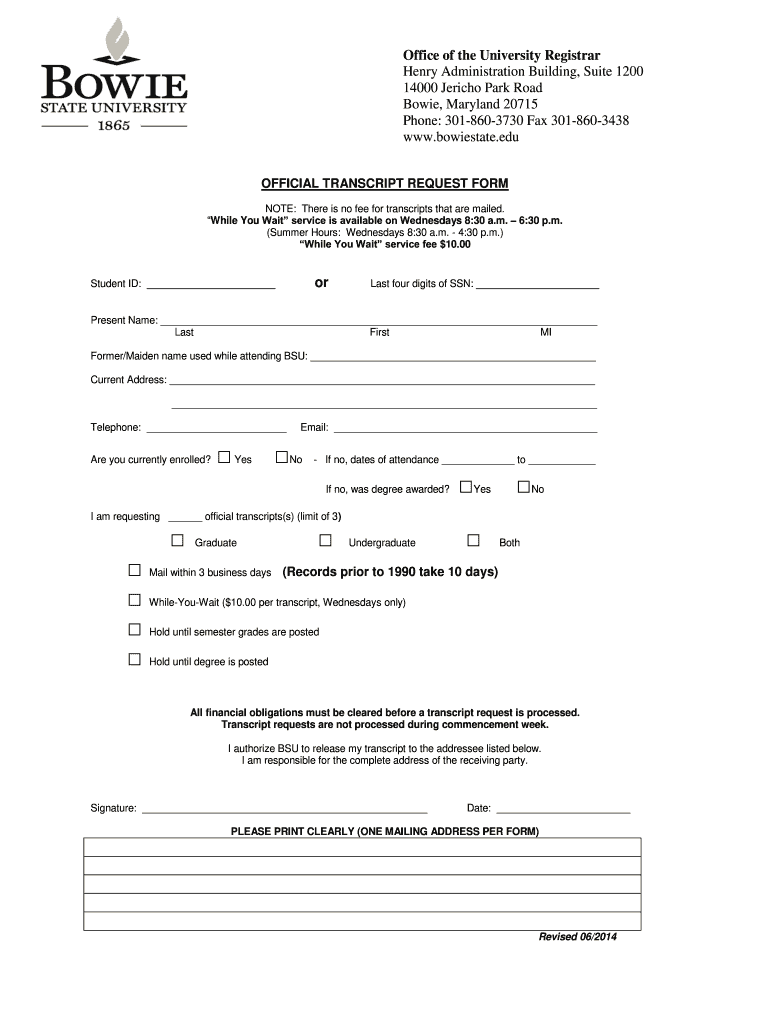
REQUEST FORM NOTE: There is no fee for transcripts that are mailed. “While You Wait” service is available on Wednesdays 8:30 a.m. – 6:30 p.m. (Summer Hours: Wednesdays 8:30 a.m. - 4:30 p.m.) “While You Wait” service fee $10.00 or Student ID: _______________________ Last four digits of SSN: ______________________ Present Name: ______________________________________________________________________________ Last First MI Former/Maiden name used while attending BSU: ___________________.
Loading

Open form follow the instructions

Easily sign the form with your finger

Send filled & signed form or save
How to fill out the Bowie State University Official Transcript Request Form online
Filling out the Bowie State University Official Transcript Request Form online is a straightforward process designed to help you efficiently request your academic transcripts. This guide will walk you through each section of the form to ensure that all required information is submitted accurately.
Follow the steps to complete your transcript request form online.
- Press the ‘Get Form’ button to access the Official Transcript Request Form, allowing you to fill it out digitally.
- Enter your student ID number in the designated field. If you do not have a student ID, you may need to provide the last four digits of your Social Security Number.
- Provide your present name, including your last name, first name, and middle initial in the appropriate sections to identify yourself.
- If applicable, include your former or maiden name used while attending Bowie State University. This helps the registrar locate your records accurately.
- Fill in your current address, ensuring all information is complete for mailing purposes. This should include street address, city, state, and zip code.
- Provide a valid telephone number where you can be reached. This is necessary in case the registrar needs to contact you regarding your request.
- Indicate if you are currently enrolled by selecting ‘Yes’ or ‘No’. If you select ‘No’, indicate your dates of attendance.
- If you are not currently enrolled, answer whether a degree was awarded during your attendance by selecting ‘Yes’ or ‘No’.
- Specify how many official transcripts you are requesting. Note that there is a limit of three transcripts per request.
- Choose how you would like the transcript to be processed: either mailed within three business days, while-you-wait service (available on Wednesdays for a fee), or held until semester grades or degree postings.
- Ensure you check that all financial obligations have been cleared before submitting your request, as this is a requirement for processing your transcript.
- Authorize Bowie State University to release your transcript by signing the form and stating the date of your request.
- Review all entries to confirm that information is correctly filled and clear, prepare your form for submission.
- Once completed, you can save changes, download, print, or share your form as needed.
Complete your Bowie State University Official Transcript Request Form online today to facilitate your transcript retrieval process.
Experience a faster way to fill out and sign forms on the web. Access the most extensive library of templates available.
Related content
Bowie State University is a leader in the infusion of technology into the curriculum while...
Students and alumni who attended Bowie State University can order an official transcript...
Sep 23, 2024 — Stephon Alexander is a first class jazz musician as well as a first rate...
Get answers to your most pressing questions about US Legal Forms API.
How do I send my college transcripts to a university?
To send your college transcripts to another university, simply fill out the appropriate request form, like the Bowie State University Official Transcript Request Form, indicating the new university as the recipient. Follow up with any specific requirements they may have regarding delivery. By doing this, you can facilitate a smooth transfer of your academic records.
How do I send my transcript to a college through parchment?
To send your transcript to a college through Parchment, start by creating an account on their platform. Request your transcript and choose the college as the recipient, ensuring you have the necessary information readily available. This method is efficient and similar to using the Bowie State University Official Transcript Request Form for official request submissions.
How do I send my college official transcripts?
To send your college official transcripts, complete the relevant request form from your institution, like the Bowie State University Official Transcript Request Form. Ensure you fill in the recipient’s information accurately and select your preferred delivery method. After submitting your request, keep an eye on the processing times to confirm when your transcripts are sent.
How to request transcripts from North Carolina State University?
To request transcripts from North Carolina State University, you should visit their official website and locate the transcript request section. Fill out their specific request form, similar to the Bowie State University Official Transcript Request Form, providing necessary details such as your student ID and the delivery method. It's a straightforward process designed to help you obtain your academic records quickly.
How can I send my official transcript?
To send your official transcript, complete the Bowie State University Official Transcript Request Form and choose your preferred delivery method. You may opt for electronic delivery or request a mailed copy. After submission, follow the instructions provided to ensure your transcript is sent correctly and promptly.
How long does it take to send transcripts electronically?
Typically, sending transcripts electronically through the Bowie State University Official Transcript Request Form may take one to three business days. However, processing times can vary based on demand and specific requests. It is always best to check the university's website for the most current information regarding transcript requests.
Can I send a PDF of my transcript?
No, you cannot send a PDF of your transcript as an official document. The Bowie State University Official Transcript Request Form requires you to request an official hard copy or an official electronic version directly from the university. This ensures that your transcript is recognized as a valid document by colleges and employers.
What is the transcript request form?
The Bowie State University Official Transcript Request Form is a document that students use to request their official academic transcripts. This form allows you to provide necessary details like your student ID, the address where the transcript should be sent, and your signature for authorization. Using this form helps ensure that your request is processed efficiently.
Are official transcripts online?
Official transcripts from Bowie State University are available online, ensuring you can access your records whenever needed. This feature is part of the university's commitment to provide modern, user-friendly services that meet today’s digital demands. You can navigate through the online portal and follow the instructions for obtaining your official transcript conveniently. Reach out today and utilize the Bowie State University Official Transcript Request Form for a smooth process.
Can you get an official transcript online?
You can indeed get your official transcript online through Bowie State University's streamlined system. By visiting their official website and completing the necessary steps, you can request transcripts easily from the comfort of your home. This accessibility is especially helpful for those living far from campus or who simply prefer handling their requests digitally. Don't forget to use the Bowie State University Official Transcript Request Form when you're ready.
Use professional pre-built templates to fill in and sign documents online faster. Get access to thousands of forms.
If you believe that this page should be taken down, please follow our DMCA take down process here.
This form is available in several versions. Select the version you need from the drop-down list below.