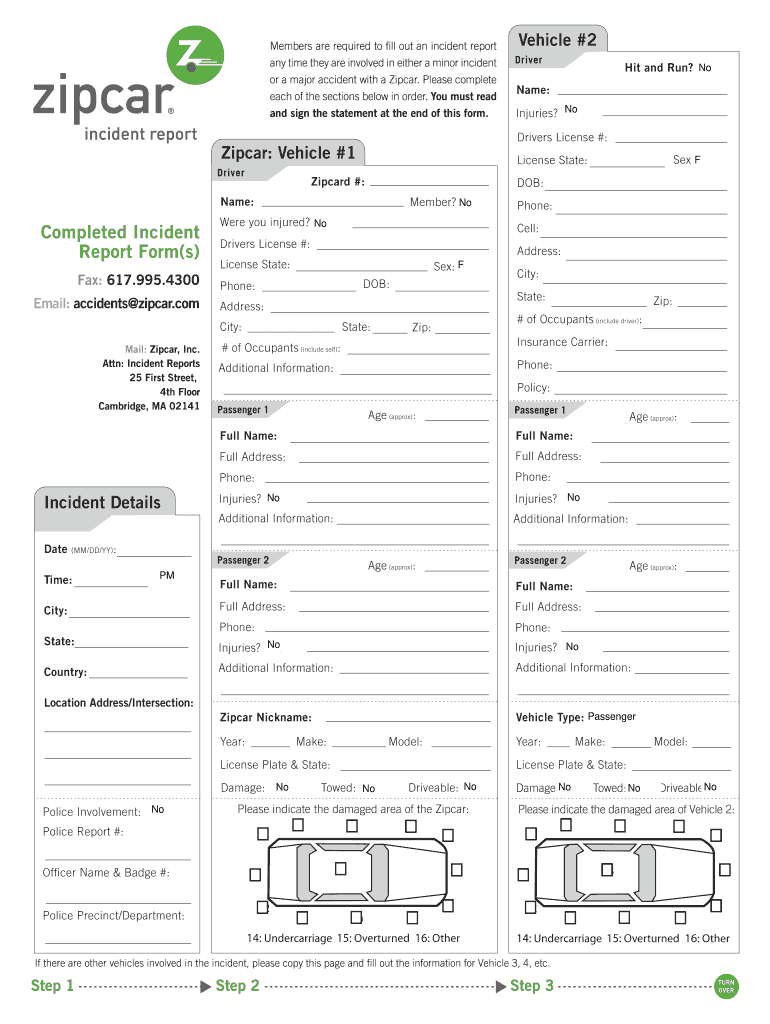
must read and sign the statement at the end of this form. Fax: 617.995.4300 Email: accidents@zipcar.com Zipcard #: Name: Y Injuries? No / N Sex:FM / F DOB: Member? No / N Y Were you injured? No / N Y Phone: Cell: Drivers License #: Address: License State: Sex: FM / F DOB: Phone: State: City: State: Address: City: Mail: Zipcar, Inc. Attn: Incident Reports 25 First Street, 4th Floor Cambridge, MA 02141 Hit and Run? No / N Y License State: Name: Completed Incident Report Form(s.
Loading

Open form follow the instructions

Easily sign the form with your finger

Send filled & signed form or save
How to fill out the Zipcar Incident Report online
Completing the Zipcar Incident Report online is essential for documenting any incidents involving a Zipcar. This guide provides a comprehensive walkthrough of each section of the report, ensuring that you have the information you need to fill it out accurately and efficiently.
Follow the steps to complete your incident report successfully.
- Click ‘Get Form’ button to access the incident report and open it for completion.
- Begin with filling out your Zipcard number, full name, and whether you sustained any injuries. Specify your gender and date of birth as required.
- Provide your phone number, address, and driver's license number, including the state of issuance. If you are driving a Zipcar, mention the vehicle number.
- Indicate if this was a hit-and-run incident and provide details regarding any other involved vehicles, including numbers of occupants.
- Fill out the insurance carrier information, including policy details if there was any insurance coverage applicable.
- Document the incident details, including the date, time, and location of the event. Record the names and contact information of all passengers and witnesses.
- Describe the incident in your own words in the designated section, providing as much detail as possible including the conditions and any traffic signals involved.
- Indicate the damages sustained by the relating vehicles, including whether they are towed or drivable, and mention if police were involved.
- Read and agree to the statement regarding your responsibility for damages, then provide your signature and printed name along with the date.
- Once all sections are completed, you can save changes, download, print, or share the incident report digitally.
Complete your Zipcar Incident Report online today to ensure your incident is well-documented.
Experience a faster way to fill out and sign forms on the web. Access the most extensive library of templates available.
Related content
Open the Zipcar app, go to the “Drive” screen, click “Report” and submit a record...
Drivers cannot have more than two incidents (moving violations plus accidents) in the past...
Mar 21, 2017 — Now with over one million members,. Zipcar is developing a new platform...
Get answers to your most pressing questions about US Legal Forms API.
Can you get banned from Zipcar?
Certainly, you can be banned from Zipcar for various infractions, such as damage to vehicles or abusive behavior towards staff. Staying informed about their policies is critical to avoid such outcomes. If you have concerns about your account, consider reaching out to customer support and submitting a Zipcar Incident Report if necessary.
Does Zipcar check your license?
Yes, Zipcar requires a valid driver's license to ensure that all users are qualified to operate their vehicles. They conduct checks on your driving record when you create your account. Maintaining a clean driving record is important, especially if you need to file a Zipcar Incident Report in case of an accident.
How do I report a problem with Zipcar?
To report a problem with Zipcar, you can use the app or website to submit your concerns directly to customer service. Providing details about the issue and filling out a Zipcar Incident Report can help them address your situation faster. Always ensure that you include any relevant information for a prompt response.
Does Zipcar monitor your driving?
Yes, Zipcar does monitor driving habits to ensure safety and promote responsible vehicle use. They may track metrics such as speed and driving patterns as part of their service. This approach helps them manage their fleet efficiently and investigate any incidents reported through the Zipcar Incident Report.
What happens if you don't return a Zipcar?
Failing to return a Zipcar can result in additional charges and penalties. Zipcar monitors car usage to maintain their service standards, and a late return can impact your account status. It might be beneficial to fill out a Zipcar Incident Report if unexpected circumstances caused the delay.
Is Zipcar account suspended after accident?
In some cases, a Zipcar account may be temporarily suspended following an accident. This is often a standard procedure to ensure safety and compliance. To restore your account, you may need to provide an explanation and possibly a Zipcar Incident Report detailing what occurred.
Can I ever get my Zipcar account back?
If your Zipcar account has been suspended, it is possible to regain access after addressing the reasons for the suspension. Typically, you need to communicate directly with Zipcar support to resolve the issue. They may require you to complete a Zipcar Incident Report or other forms before reinstating your account.
What if you damage a Zipcar?
If you damage a Zipcar, it is crucial to document the incident thoroughly. You should report the damage immediately to Zipcar using the app or website, including filing a Zipcar Incident Report. They will guide you through the next steps, which often include potential fees for repairs.
What if I left something in my Zipcar?
If you left belongings in a Zipcar, you should contact Zipcar customer service as soon as possible. They typically have a lost and found process in place and may assist you in retrieving your items. Additionally, reporting the situation through a Zipcar Incident Report may expedite the recovery process.
What are examples of incident reports?
Examples of incident reports can range from car accidents to safety issues in various settings. A typical example for a Zipcar would include details about a collision or damage incurred during a rental period. The report should clearly outline the facts, participants, and circumstances surrounding the incident. This structured approach is crucial for effective record-keeping and accountability.
Use professional pre-built templates to fill in and sign documents online faster. Get access to thousands of forms.
If you believe that this page should be taken down, please follow our DMCA take down process here.