Loading
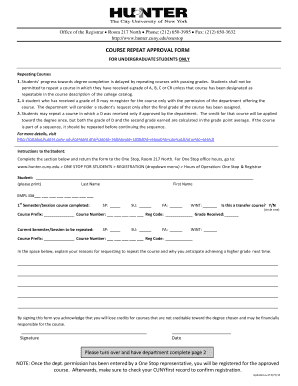
Get Course Repeat Approval Form - Hunter College - Hunter Cuny
How it works
-

Open form follow the instructions
-

Easily sign the form with your finger
-

Send filled & signed form or save
How to use or fill out the COURSE REPEAT APPROVAL FORM - Hunter College - Hunter Cuny online
This guide provides step-by-step instructions for completing the Course Repeat Approval Form at Hunter College. Whether you are seeking to repeat a course or require departmental approval, this comprehensive guide will assist you in properly filling out the form online.
Follow the steps to successfully complete the form.
- Press the ‘Get Form’ button to obtain the Course Repeat Approval Form and open it in your preferred editing tool.
- Begin by filling out your personal information. Include your last name, first name, and your EMPL ID number in the designated fields.
- Indicate the semester or session in which you completed the course you wish to repeat. You may select from Spring (SP), Summer (SU), Fall (FA), or Winter (WINT).
- Specify whether the course is a transfer course by circling 'Y' for Yes or 'N' for No.
- Enter the course prefix and course number of the completed course. Also, include the registration code associated with the course.
- Next, indicate the semester or session in which you intend to repeat the course by selecting the appropriate options for course prefix and semester (SP, SU, FA, WINT), and providing the course number and registration code.
- Document the grade received in the previous attempt of the course in the designated field.
- In the provided space, clearly explain your reasons for requesting to repeat the course and outline how you expect to achieve a higher grade in your next attempt.
- Complete the form by signing and dating it, acknowledging that you are aware of the potential loss of credits for courses not applicable to your degree, as well as any financial responsibilities.
- Once you have filled out your portion of the form, return it to the One Stop office, Room 217 North, for departmental approval.
- After departmental permission is granted, verify your registration through your CUNYfirst account to confirm the course registration.
Complete your Course Repeat Approval Form online today to ensure timely registration and academic progress.
The CUNY "F" Policy allows for an "F" grade, or any administrative failing grade, such as "WU" or "WF," to be excluded from the calculation of your cumulative GPA if you retake the failed course and receive a grade of "C" or better, and then fill out the Students must then fill out the "F" Policy application form [link ...