Loading
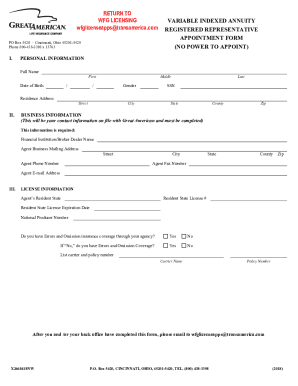
Get Wfg Provider Appointment Cover Sheet
How it works
-

Open form follow the instructions
-

Easily sign the form with your finger
-

Send filled & signed form or save
How to fill out the WFG Provider Appointment Cover Sheet online
Completing the WFG Provider Appointment Cover Sheet online is an essential step for individuals seeking to work with WFG. This guide provides clear and supportive instructions to ensure you fill out the form correctly and efficiently.
Follow the steps to complete the form accurately
- Click ‘Get Form’ button to acquire the form and access it in the editing interface.
- Fill in the date at the top of the form. This should reflect the date you are completing the form.
- Enter the fax number ‘678.966.6100’ in the designated field for faxing the completed form.
- Provide your associate name in the appropriate section. Ensure to use the name you are officially registered under.
- Input your associate WFG ID in the next field. This ID is crucial for your identification within WFG.
- Indicate whether you have submitted any business or if you have business pending by selecting ‘yes’ or ‘no’.
- If you answered ‘yes’ to the previous question, complete the section by detailing the writing date and the client name.
- Review all the fields you have completed to ensure accuracy before submitting.
- Once all information is filled out correctly, save changes, and you can download, print, or share the form as needed.
Ensure your documentation is error-free and complete these steps to submit your WFG Provider Appointment Cover Sheet online.