Loading
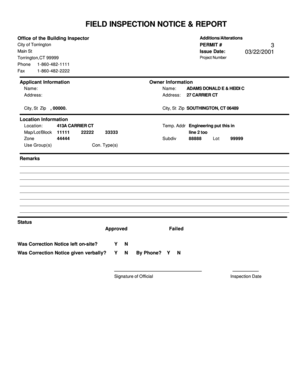
Get Field Inspection Notice & Report
How it works
-

Open form follow the instructions
-

Easily sign the form with your finger
-

Send filled & signed form or save
How to fill out the Field Inspection Notice & Report online
Filling out the Field Inspection Notice & Report online is an essential process for documenting inspections related to building projects. This guide will provide clear and concise instructions on how to complete the form accurately.
Follow the steps to complete the Field Inspection Notice & Report online.
- Click ‘Get Form’ button to obtain the form and open it in the online editor.
- Enter the permit number in the designated field. This helps identify the inspection specific to the permit.
- Fill in the issue date, which indicates when the inspection notice was created.
- Provide the applicant's information. This includes the full name and address of the individual or entity applying for the inspection.
- Fill out the owner’s information, including their name and address.
- Input the location information where the inspection is taking place. Include the street address, map/lot/block numbers, and zone details.
- Complete the section regarding the status of the inspection. Indicate if the inspection has been approved or failed.
- Mark whether a correction notice was left on-site or communicated verbally to the owner.
- Provide the inspection date to document when the inspection occurred.
- Finally, review all entered information for accuracy, then save changes, download, print, or share the completed form as necessary.
Begin filling out your Field Inspection Notice & Report online today!
The objective of field inspection is to verify the seed crop which is: - · Raised from seed whose source is approved and which satisfies the requirement of genetic and physical purity.