Loading
Get Gilbert Plumbing Warranty Policy
How it works
-

Open form follow the instructions
-

Easily sign the form with your finger
-

Send filled & signed form or save
How to fill out the GILBERT PLUMBING WARRANTY POLICY online
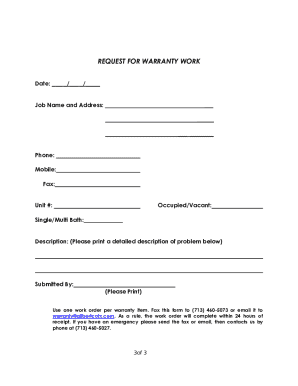
Filling out the Gilbert Plumbing Warranty Policy online is a straightforward process that ensures your warranty coverage is properly documented. This guide provides detailed instructions for each section of the form, making it easier for you to navigate the warranty request process.
Follow the steps to complete your warranty policy form accurately.
- Click ‘Get Form’ button to access the warranty policy form. This will allow you to retrieve the document and begin filling it out in an accessible format.
- Enter the date in the designated field, making sure to use the correct format (MM/DD/YYYY). This helps ensure that your warranty coverage is tied to the correct timeline.
- Provide the job name and address accurately. This information identifies the location of the service and ensures that the warranty pertains to the correct property.
- Fill out your phone number and mobile number in the respective fields. This allows Gilbert Plumbing Company to contact you regarding your warranty issues.
- If applicable, include your fax number. This is optional but can facilitate quicker communication if necessary.
- Specify the unit number, if relevant, to further clarify which property the warranty request pertains to.
- Indicate whether the unit is occupied or vacant by selecting the appropriate option. This classification helps prioritize responses from the service team.
- Select whether your property has a single or multi-bath setup for more tailored service.
- In the description field, provide a detailed account of the problem you are experiencing. Be clear and concise, providing all necessary details to help the service team understand the issue.
- Print your name in the 'Submitted By' section to indicate who is making the request. Ensure this is accurate as it will be connected to your warranty claim.
- Once all fields are filled out, you may fax the completed form to (713) 460-5073 or email it to warranty@gilbertcotx.com. Make sure to retain a copy for your records.
- For emergencies, after sending the fax or email, follow up immediately by calling (713) 460-5027 to ensure your request is acknowledged.
Complete your warranty documentation online today to ensure you have the protection you need.