Loading
Get Form 4033
How it works
-

Open form follow the instructions
-

Easily sign the form with your finger
-

Send filled & signed form or save
How to fill out the Form 4033 online
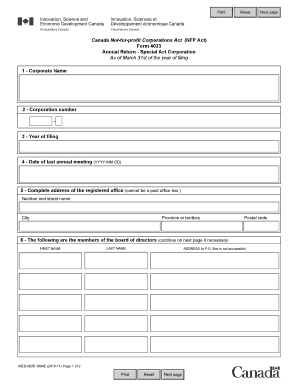
Filling out the Form 4033 online is a straightforward process that allows you to submit your annual return for your special act corporation. This guide provides step-by-step instructions to ensure all sections are completed accurately and efficiently.
Follow the steps to fill out the Form 4033 online successfully.
- Click ‘Get Form’ button to obtain the form and open it in the editor for completion.
- Enter the corporate name exactly as registered. This is the name under which the corporation operates.
- Provide the corporation number, which can be found in your corporate records. This number uniquely identifies your corporation.
- Specify the year of filing, which should correspond to the year for which you are submitting the annual return.
- Fill in the date of the last annual meeting using the format YYYY-MM-DD. Ensure this date reflects the most recent meeting held by the corporation.
- Complete the address of the registered office. Note that this must be a physical address and cannot be a post office box. Fill in the number and street name, city, province or territory, and postal code.
- List the current members of the board of directors. For each director, provide the first name, last name, and address (again, a P.O. Box is not acceptable). If there are additional members, continue this information on the next page.
- In the declaration section, certify your position as a director or authorized officer of the corporation. Include your signature, telephone number, and printed name.
- Review all entered information for accuracy and completeness before submission.
- Once everything is complete, you can save changes, download, print, or share the form as needed.
Complete your Form 4033 online today to ensure timely filing and compliance.
Form 433-D is the basic installment agreement, while Form 9465 is the Installment Agreement Request. This form allows the IRS to set up automatic payments with a taxpayer. ... It affords the taxpayer a lower user fee than a regular agreement.