Loading
Get Ussc King Pellet Stove Owner's Manual
How it works
-

Open form follow the instructions
-

Easily sign the form with your finger
-

Send filled & signed form or save
How to fill out the USSC King Pellet Stove Owner's Manual online
This guide provides a comprehensive overview of filling out the USSC King Pellet Stove Owner's Manual online. By following the steps outlined, users can ensure they complete the necessary information accurately and efficiently.
Follow the steps to fill out the owner’s manual accurately.
- Click ‘Get Form’ button to obtain the manual and open it in the editor.
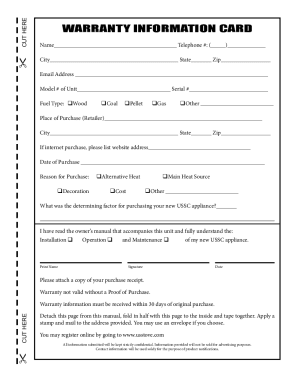
- Locate the warranty registration section in the document. Fill in your name, contact number, and complete the address fields accurately.
- Specify the model number and serial number of your unit, which can typically be found on the unit itself.
- Select the type of fuel your pellet stove uses by checking the appropriate box.
- Indicate where you purchased the stove, providing the retailer's name and the website if applicable.
- Complete the date of purchase and state your reason for purchasing the stove.
- Confirm that you have read and understood the operational and maintenance procedures by checking the appropriate boxes.
- Print your name, add your signature, and date the form.
- Review the completed form for accuracy before saving your changes.
- Finally, save changes to your document, then download, print, or share the completed manual as required.
Complete the USSC King Pellet Stove Owner's Manual online for hassle-free management.
0:02 1:01 My pellet stove is not feeding pellets. What should I do? - YouTube YouTube Start of suggested clip End of suggested clip Again. Check that venting pipe to make sure it's cleaned it has to be clean. Now. You want to lookMoreAgain. Check that venting pipe to make sure it's cleaned it has to be clean. Now. You want to look to see if the red call light or the status. Light is on that's.