Loading
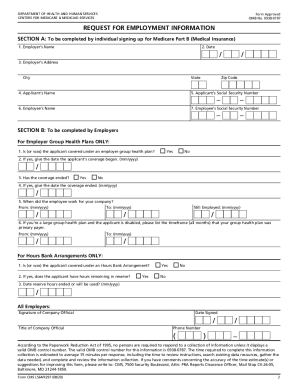
Get Cms-l564 2020-2026
How it works
-

Open form follow the instructions
-

Easily sign the form with your finger
-

Send filled & signed form or save
How to fill out the CMS-L564 online
The CMS-L564 is an essential document required for Medicare applications during a Special Enrollment Period. This guide will provide you with clear and supportive instructions on completing the form online.
Follow the steps to complete the CMS-L564 effectively.
- Press the 'Get Form' button to access the CMS-L564 form and open it for completion.
- In Section A, begin by entering your employer's name. This information is crucial for the employer to verify your group health plan coverage.
- After completing Section A, submit the form to your employer for them to fill out Section B.
- In Section B, your employer will first check if you are covered under an employer group health plan and indicate this response accordingly.
- Ensure all fields are filled accurately, then your employer must sign and date the form to finalize the information.
- Once everything is complete, you can save the document, download it, print it, or share it as needed.
Complete your Medicare application by filling out the CMS-L564 online today.
Letter or statement from Medicare or the Social Security Administration stating your Medicare Part A coverage termination date. Document from a government agency showing you or your family members are: